
Participating Frequently
May 25, 2018
Answered

Problem with strange character spacing

  • May 25, 2018
  • 4 replies
  • 7279 views

Hello,

Since a couple of weeks, InDesign started making strange bigger spaces between characters -  especially on the left side of the columns. It happened in a few exisiting independent documents, with which I had been working for a few years without any problem.

There is also a non-seen special character in the beginning of the paragraphs now, which I had never seen before - I don't know what it is, but deleting it didn't help.

I don't know how to attach a file sample (please advise, how to do it), so I'm posting an exported jpg of it:
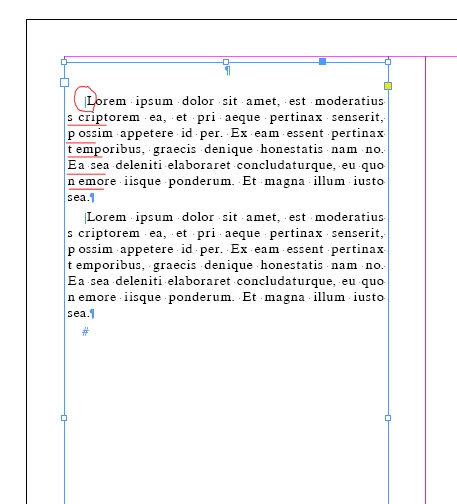
If anyone can advise me, who to solve it, I would greatly appreciate it!

Thank you very much!

This topic has been closed for replies.
Correct answer hammer0909

I'm sorry, I don't know what a composer is.

I write the text by double-clicking within a frame and then type in, or paste (in this case, without formatting).

Here's a link to the file:

text.indd - Google Drive

Thank you!


You've said previously that you're copying and pasting text from somewhere else into InDesign. It appears that there's an extra character in front of each paragraph. I did a little research and it appears to be a punctuation space. I think this is the extra space you're referring to? You can delete that space character and even to a find/replace to get rid of them. This does remove some of the space. Beyond that, you are using a first line indent on each paragraph that is applying a 4mm indent to the first line and then a 1mm indent to the remaining lines of the paragraph.

4 replies

doGraphics
Inspiring
May 21, 2020

I have a simlilar or ven worse issue. I tried left align or left justification and it doesn't make a difference for me, InDesign still gives me odd gaps. I also chaged the different composer settings, and nothing. Any ideas? Thanks!

This is driving me nuts. Any idea of what is going on? Thanks!

Srishti Bali
Community Manager
Community Manager
May 29, 2018

Hi Jerusalem,

I would like to know if the steps suggested above worked for you, or the issue still persists.

Kindly update the discussion if you need further assistance with it.

Thanks,

Srishti

Participating Frequently
May 30, 2018

Hello,

I was trying to post a reply earlier, it didn't work hope it works now.

Thanks all for your feedback.

So far non of the solution seems to work.

1. What version of InDesign and what operating system?

InDesign CS 6 and Windows 10.

2. What font are you using?

I used the fonts SKSamsonPolUni_W and MgOldTimes UC Pol . All fonts are installed. Changing to other fonts didn't help.

3. Does the spacing correct itself when you change the alignment to left, or when you use a different font?

When I select a non justified alignment (right, left or center), the spaces disappear. But in any kind of justified alignment (and this is what I need), the spaces are there. If I change and change back, they reappear.

4. Have you tried recomposing the story? (Win: Ctrl-Alt-/; Mac: Command+Option+/)

I'm sorry, I don't know what "recomposing the story" means, but pressing "Ctrl-Alt-/", with the text selected or not, didn't work.

The Indent is set to 0.

Community Expert
May 30, 2018

What's the composer you are using in paragraph formatting?

Regards,
Uwe

jane-e
Community Expert
Community Expert
May 25, 2018

JerusalemNun  wrote

I don't know how to attach a file sample (please advise, how to do it)...

Hi Jerusalem,

You can't "attach" a file sample, but you can share a file through Dropbox or another file sharing service and post a link.

~ Jane

Barb Binder
Community Expert
Community Expert
May 25, 2018

Hi JerusalemNun:

That is odd.

  1. What version of InDesign and what operating system?
  2. What font are you using?
  3. Does the spacing correct itself when you change the alignment to left, or when you use a different font?
  4. Have you tried recomposing the story? (Win: Ctrl-Alt-/; Mac: Command+Option+/)

~Barb

~Barb at Rocky Mountain Training
Eric Dumas
Community Expert
Community Expert
May 25, 2018

It looks line a 'First Line Indent' formatting option is applied to the text.

Select some of the text and check in the ribbon (Paragraph section) if that's the case. It could be part of your Paragraph Style

Inspiring
May 25, 2018

I don't think the indent is the issue. It's the weird spacing between the first couple of characters on the lines that follow. Interestingly, even that is not consistently wrong -- lines 2, 3, 4 and 6 look like they have extra space after the first character, but lines 5 and 7 do not. I haven't been able to replicate that here, with or without the invisible character. 

The invisible character appears to be a discretionary line break. Not sure what would have caused that to appear at the beginning of a paragraph, but I see no reason not to delete it, even if it doesn't resolve this problem.