
Participating Frequently
April 5, 2023
Answered

Problem with Table of Contents Formatting

  • April 5, 2023
  • 1 reply
  • 467 views

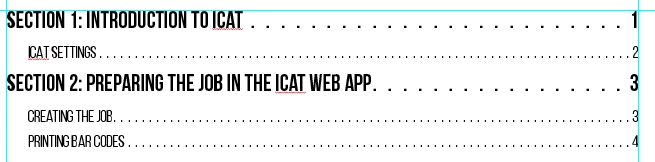
I've set up my table of contents using two levels of formatting.  Here is a preview.
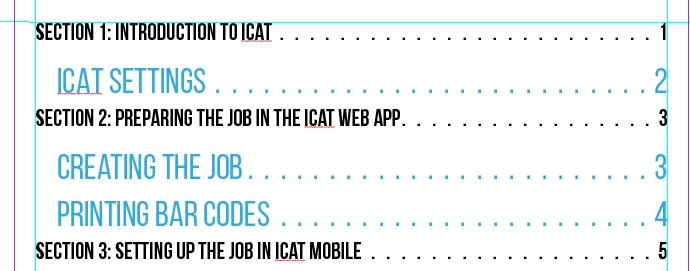
When I update the toc, it applies my Page Heading character style to one of the toc paragraph styles as you can see here.
 

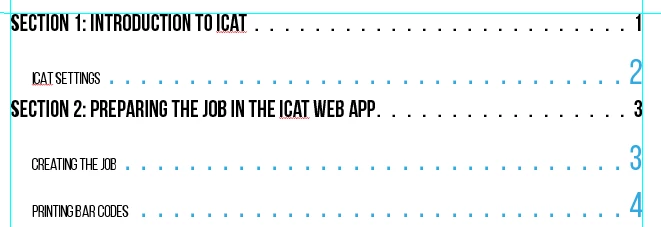
To solve this, I select all of the toc text and manually set the character style to "None" on the character styles panel.  As you can see, that fixes the text, but the leader and page numbers retain the Page Heading character style. 
The only way to resolve it is to select each of the lines and clear overrides from the paragraph style.  I have to go through this every time I update the toc.  Any ideas what is causing this or how to fix it?

This topic has been closed for replies.
Correct answer James Gifford—NitroPress

TOCs will pick up all character formatting in the paragraphs they collect. The basic solution is to not use any character styles (or overrides) in any heading that needs to be included in the TOC.


1 reply

James Gifford—NitroPress
Legend
April 5, 2023

TOCs will pick up all character formatting in the paragraphs they collect. The basic solution is to not use any character styles (or overrides) in any heading that needs to be included in the TOC.


Participating Frequently
April 5, 2023

Thanks for the reply.  That did the trick.  I actually had a character style and paragraph style that were essentially the same thing.  I got rid of the character style to solve the issue.

I appreciate the help.

James Gifford—NitroPress
Legend
April 5, 2023

Great! This is an easy one. When a character format is needed in a heading and you don't want it in the TOC entry, it gets a lot messier.