

Participant
September 13, 2023
Answered

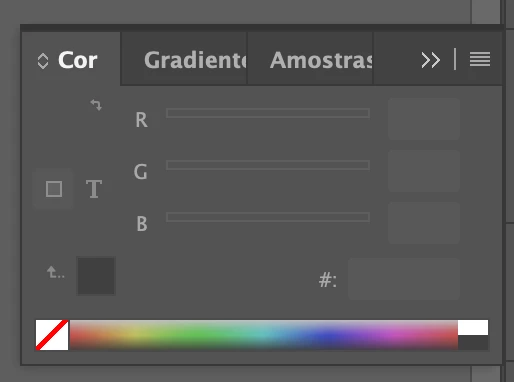
problema com janela de cores no inDesign

estou com ... nao consigo editar cores ou mudar uma cor ja existente em um objeto.
a janela fica desativada ... o que devo fazer?

Aparece dessa forma pra mim
This topic is closed to new replies. Start a new post to keep the conversation going.
Eugene TysonCorrect answer
Community Expert
September 16, 2023

Try resetting your preferences:

Windows: Start InDesign, and then press Shift+Ctrl+Alt. Click Yes when asked if you want to delete preference files.
macOS: While pressing Shift+Option+Command+Control, start InDesign. Click Yes when asked if you want to delete preference files.
A dialog will appear asking to delete the InDesign Preferences, select 'Yes' on this dialog.
Further info and instructions here if needed:
https://helpx.adobe.com/in/indesign/kb/indesign-preferences-support-file-locations.html


1 reply

Eugene TysonCommunity ExpertCorrect answer
Community Expert
September 16, 2023

Try resetting your preferences:

Windows: Start InDesign, and then press Shift+Ctrl+Alt. Click Yes when asked if you want to delete preference files.
macOS: While pressing Shift+Option+Command+Control, start InDesign. Click Yes when asked if you want to delete preference files.
A dialog will appear asking to delete the InDesign Preferences, select 'Yes' on this dialog.
Further info and instructions here if needed:
https://helpx.adobe.com/in/indesign/kb/indesign-preferences-support-file-locations.html


Translate
