
Participant
July 9, 2024
Answered

problème affichage sur 2eme écran

  • July 9, 2024
  • 2 replies
  • 532 views

Bonjour, 

Je suis sur Macbook Air M2 Sonoma en 14.5

Depuis quelques temps j'ai un problème avec  InDesign (et seulement in design). Lorsque celui-ci se lance il se lance sur l'ecran de mon M2 mais lorsque je veux déplacer ma fenètre InDesign sur mon 2ème écran (HDMI) la fenetre est indeplaçable. Au mieux en décochant la fonction "cadre de l'application dans fenêtre" je peux deplacer mon espace de travail et les outils 1 à 1. La manipulation reste fastidieuse et je souhaiterai trouver ce qui m'empêche par un simple glisser-déposer de déplacer mon app InDesign dans son intégralité et en 1 fois sur mon 2ème écran.

Merci à tous pour votre aide

Caroline
Correct answer caroline38507863zau8

Bonjour,

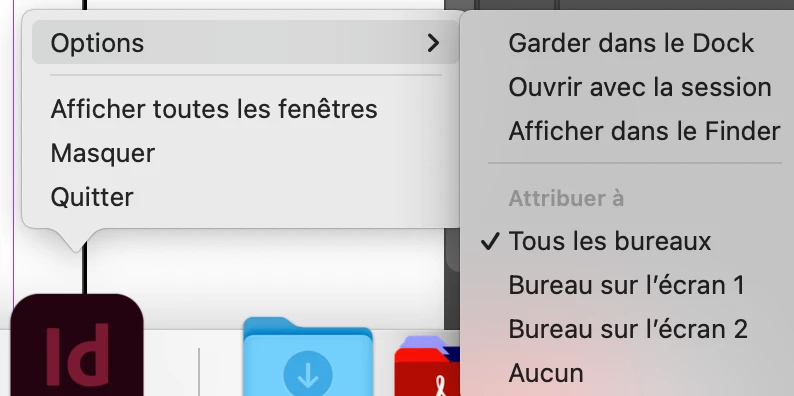
La solution qui fonctionne est de faire un clic droit sur l'icone de indesign et de choisir dans les options -> attribuer à "tous les bureaux" et si tu n'a pas de fenetres "volantes" tu peux tout déplacer en même temps 😉


2 replies

Participant
September 8, 2025

Bonjour Caroline,

As-tu trouvé une solution à ce problème? Je rencontre exactement le même et ça devient handicapant, je jongle avec plusieurs écrans et je déplace mes outils et fenêtres 1 par 1. Merci ! 

Florence 

Florence
Abhishek Rao
Community Manager
Community Manager
September 9, 2025

Hi @florence_b,


I'm sorry to hear you're running into the same issue with moving InDesign to a second screen. Is the issue specific to a particular file or happens with all? Could you please confirm the make and model of your second monitor and the connection type you're using, such as HDMI or USB-C? Sometimes switching to a different connection can resolve these display issues. Also, let me know your OS version and the InDesign version you're on. If possible, a short screen recording showing the issue in action would be helpful. 


Looking forward to hearing from you.

Abhishek

Community Expert
July 11, 2024

Can you tell us the make and model of your 2nd monitor?

I have similar setup and no issues. 

Can you connect with a different method other than HDMI? Maybe USB-C cable?