Participant
September 6, 2024
Question

Problème d'ajustement du bloc au contenu

  • September 6, 2024
  • 3 replies
  • 466 views

Bonjour,

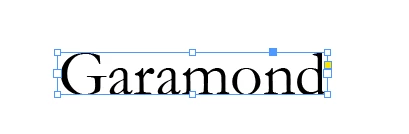
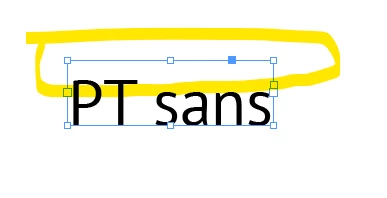
Je n'arrive pas à ajuster le bloc de texte au contenu avec la police "PT sans" alors qu'il n'y pas de problème avec les autres polices. J'ai réinstallé la police sans succès.

Merci de votre aide


This topic has been closed for replies.

3 replies

jmlevy
Community Expert
Community Expert
September 6, 2024

Quelle est la version de la plice que tu utilises ? J'ai activé celle d'Adobe Fonts et je n'arrive pas à reproduire le problème.

Edit: @Mike Witherell a posté en même temps et je pense qu'il a la bonne réponse : 


Participant
September 6, 2024

@jmlevymerci j'ai supprimé les polices qui était installées et je les ai réinstallées depuis Adobe Fonts et ça fonctionne!

Sûrement un problème de compatibilité ou de version en effet! Merci pour le conseil!

Mike Witherell
Community Expert
Community Expert
September 6, 2024

It might be aligning to the bottom of the textframe. Press Cmd/Ctrl+B for text frame options and see whether the vertical alignment is changed.

Mike Witherell
Community Expert
September 6, 2024

Great suggestion @Mike Witherell 

I think also if they go into the Text Frame options and look at the First Baseline setting - it could be something to do with that

https://creativepro.com/understanding-the-first-baseline-position-of-text/


Abhishek Rao
Community Manager
Community Manager
September 6, 2024

Hi @laurent_4444,


I understand how frustrating it can be when text blocks don't adjust properly with certain fonts. To better assist you, could you please let me know your InDesign version and the operating system you're using?


In the meantime, try these steps:
1. Ensure that the font "PT Sans" is correctly installed and activated in your system and InDesign.
2. Some fonts may have different spacing metrics, which can affect how text blocks adjust. You can manually resize the text frame or use the "Fit Frame to Content" option (Object > Fitting > Fit Frame to Content).
3. If there are any paragraph or character styles applied, try resetting them to see if that resolves the issue.


If the problem persists, feel free to share more details, and we'll continue troubleshooting. Also, let me know if it's happening with all text frames or just one specific case.


Looking forward to hearing from you!


Best,  
Abhishek Rao

Participant
September 6, 2024

Hi,


Thanks for your reply.

I have 19.5 version on Windows 11.

It happens only with "PT sans" text frame