


Participant
December 2, 2025
Question

Problème Mise à jour du contenu dans Partage pour révision dans InDesign

  • December 2, 2025
  • 6 replies
  • 680 views

Bonjour,

Je peux sans problème Créer un lien de partage pour révision dans InDesign. Par contre, il semblerait qu'il y ait une limite de poids de fichier ou de nombre de pages (quelques tests réalisés...) lors de la mise à jour du fichier partager. J'ai en effet un message d'erreur.
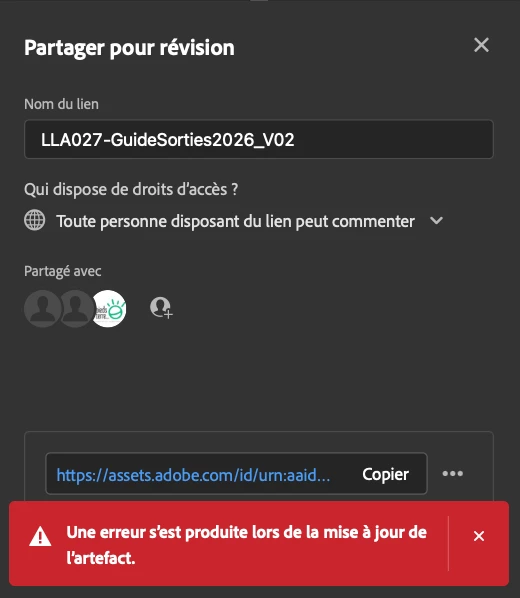
Capture d’écran 2025-12-02 à 12.37.31.png

Avez-vous des infos à ce sujet ?
Merci

6 replies

January 16, 2026

Bonjour, lorsque je souhaite mettre à jour mon lien de revision dans indesign,j'ai un message d'erreur : 

“Une erreur s’est produite lors de la mise à jour de l’artefact.”
comment corriger svp?
creative explorer
Community Expert
Community Expert
January 17, 2026

@evelyne_9874 somewhere along the lines it got de-sync. Maybe the link got corrupted. I would go back to the links and create a new fresh link. If you don't want to lose comments, export your document as an IDML file, reopen it, and save it as a new .indd file. This often "strips" the background cloud errors and allows a fresh start.

m
December 30, 2025

I am having basically the same problem. I'm working on a new copy of a file (I'm updating a project a few years later) and I've deleted review links, rebooted, updated InDesign, cleared preferences on InD restart, etc. I did change the original setup of the review link from "invited people only" to Anyone with the link can comment. Despite that I still get the error "error getting invited people" like it's stuck in that mode. I can delete the link and generate a new one, but then of course the old one doesn't work. That doesn't help much for tracking comments/responses/edits. Essentially I can't update the content once the review link has been published. 


This feature worked successfully for me in the past but it is not now. I am on a PC/Win10 with the latest InD. Any help is appreciated.

Abhishek Rao
Community Manager
Community Manager
December 30, 2025

Hi @GAskygirl,


Thanks for sharing the details, and sorry to hear that you're experiencing this too. I'm assuming by 'latest' you're referring to InDesign 21.1, please correct me if that's not the case. As a first step, please try signing out of the Creative Cloud desktop app completely, then sign back in and relaunch InDesign to check if the Share for Review option starts working normally. If the issue persists, please try switching your network connection, for example, connecting through your phone's hotspot, and then test Share for Review again. 

If you still see the same error, please close all Adobe apps and try renaming the following folders, then restart your system and test again. Rename the CoreSync folder at C:\Program Files (x86)\Adobe\Adobe Sync\CoreSync to CoreSync1. Rename the CEP folder at C:\Program Files (x86)\Common Files\Adobe\CEP to CEP1. Rename the UXP folder at C:\Program Files\Common Files\Adobe\UXP to UXP1.

If none of the above helps, the last step would be to completely uninstall InDesign and the Creative Cloud desktop app using the Creative Cloud Cleaner Tool, then reinstall fresh. You can find the cleaner tool here: https://adobe.ly/4aVHhkv and the reinstall steps here: https://adobe.ly/49abQ3e


Looking forward to hearing back your observations.

Abhishek

December 30, 2025

Hello Abhishek, thanks for the detailed reply. I completed all of these steps with the exception of the network change (cell service here is generally unrewarding). I still found the same basic problem with updating the review link, error "There was an error updating the artifact." I tried deleting the review link and creating a new one with a different name and "anyone with the link can comment" for access--same problem. 

Mike Witherell
Community Expert
Community Expert
December 2, 2025

Based on your replies, it still seems possible that your file has a corrupt page or page element within the file.

Here is a link to a compendium of troubleshooting, which includes strategies for how to find the page the corruption is on.

Mike Witherell
Participant
December 2, 2025
Okay, thank you.
I'll take a look at it.
Mike Witherell
Community Expert
Community Expert
December 2, 2025

It seems like there is a problem in a page of your document, then? 

Have you tried exporting to IDML and re-opening a new InDesign document from it so that you can test further?

Mike Witherell
Participant
December 2, 2025
I incorporated the pages one by one into a new document, updating after each addition. This worked up to page 18 or 20. I initially thought the problem was with the last imported page. But no, the problem persisted with a different new page.
The problem disappears when I reduce the number of pages.

And there's no problem with a similar document containing fewer pages.
Abhishek Rao
Community Manager
Community Manager
December 2, 2025

Hello @sébastienb83597176,


I appreciate the information and the screenshot. I can see how frustrating this situation must be. Please follow the expert's suggestions and make sure to share your findings. Additionally, could you confirm the version of InDesign you are using along with your operating system details? Also, let me know if this issue occurs only with this particular document or if you observe the same problem with other files as well. It would be beneficial if you could test Share for Review with a smaller file first, followed by a larger one, and share your observations, so I can compare the outcomes.

Furthermore, does the error appear in the Share sheet exactly as depicted in your screenshot, but the update is still correctly reflected on the review link in the browser? If that's the case, a bug has already been reported for this issue, and the team is investigating it. Reference: Persistent error in Adobe InDesign: There was an error updating the artifact.

It would also be extremely helpful if you could package and share the affected file for testing, so I can attempt to replicate the issue on my end. You may use any public cloud service such as Google Drive or Dropbox, and if the content is sensitive, feel free to send it via direct message.


I'm here to assist you and will be on the lookout for your update.

Abhishek

Participant
December 2, 2025

Hello,

This works perfectly with a similar file containing fewer pages. However, the problem recurs with documents containing more pages (approximately 20+ pages). I tried updating the file by gradually adding two pages at a time, until the problem occurred.

When the problem occurs, the update in the browser fails.

I have attached a file experiencing the issue: https://we.tl/t-rTEJpRwjfN
Thanks
SB
Mike Witherell
Community Expert
Community Expert
December 2, 2025

How many pages are you uploading for review? The bigger the file, the slower it will respond.

Or is it erroring on a corrupt object within the pages?

Mike Witherell
Participant
December 2, 2025
 
From 32 to 40 pages. Apparently, it works up to about 20 pages. Perhaps it's a file size issue?
I've tried each page independently and I don't get any errors, so it's not due to a corrupted object on one of the pages.
Anubhav M
Community Manager
Community Manager
December 2, 2025

Hello @sébastienb83597176,

Thanks for confirming. Could you share a link to a sample file here or via DM to Abhishek or me, so we can investigate this further with the product team?

Looking forward to hearing from you.

Anubhav