Participating Frequently
May 28, 2026
Answered

Problème profil ICC sur InDesign

  • May 28, 2026
  • 3 replies
  • 35 views

Bonjour à tous,

Je me permets de vous contacter pour un problème que je n’arrive pas à solutionner depuis pas mal de temps et qui me fait perdre pas mal de temps.

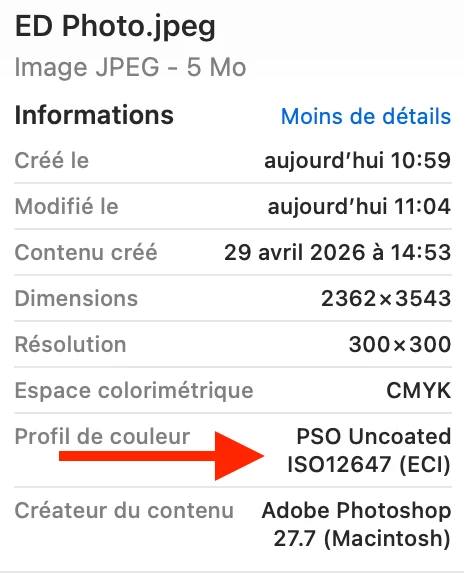
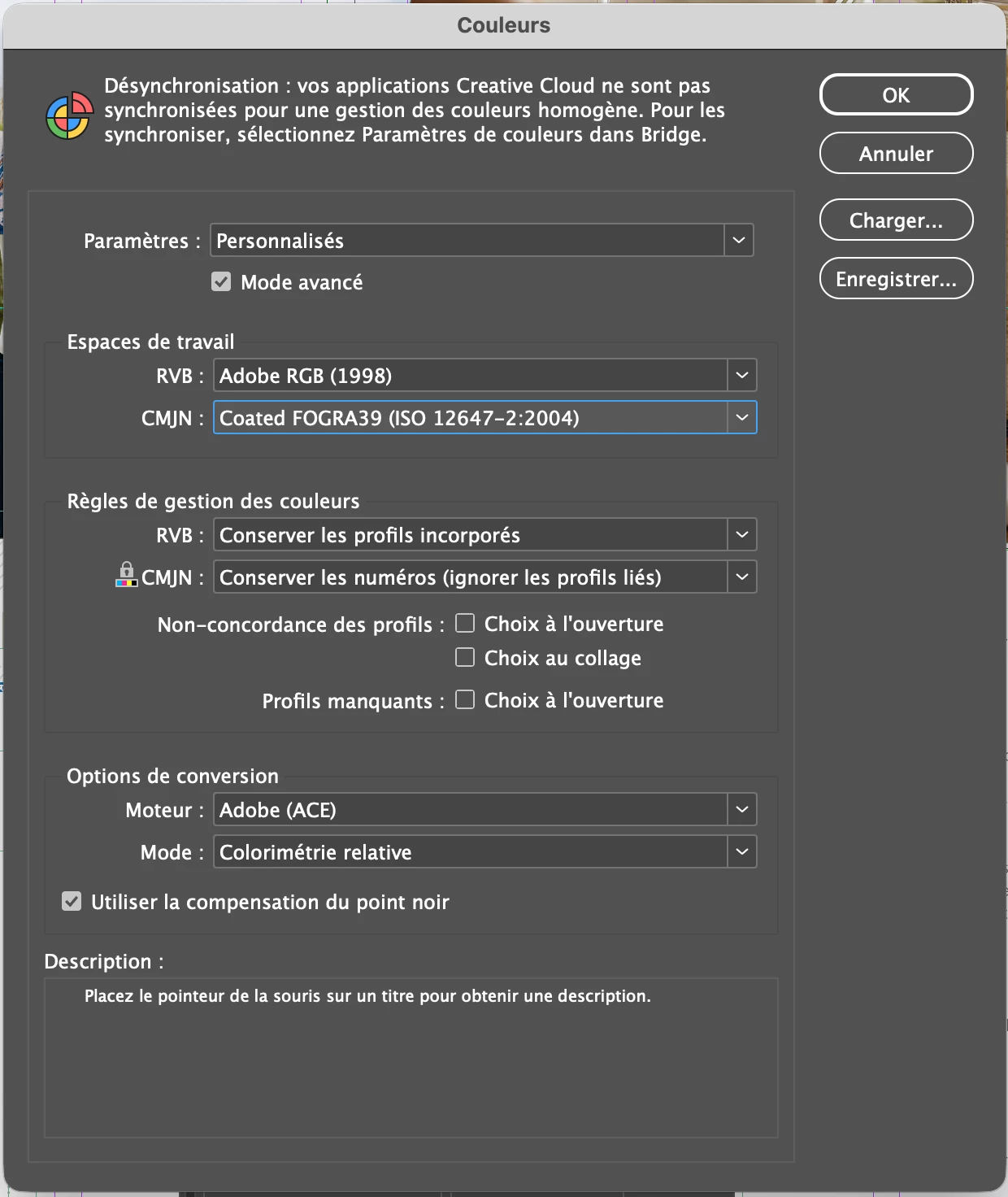
Les photos de mon document sont toutes converties avec le profil PSO Uncoated ISO12647, cependant dans les informations InDesign, il m’affiche le profil Coated FOGRA 39 (ISO 12647-2:2004), il n’affiche pas le bon profil incorporé à la photo et cela malgré même les réglages que j’ai effectué dans “couleurs” (Edition > Couleurs…). 

Quelqu’un saurait-il m’aider à résoudre ce problème ?

Par avance merci. :) 
 

    Correct answer rob day

    Right, so placed CMYK images are color managed with the InDesign document’s assigned profile, not its embedded profile, which is ignored.


    Check Edit>Assign Profiles… Your document’s profile, which is set to Coated FOGRA 39 is used to color managed placed images. What is the document’s print destination? Will it be printed on on coated paper on an offset press running to the Coated FOGRA 39 profile?

    3 replies

    rob day
    Community Expert
    Community Expert
    May 28, 2026

    Also, it looks like your document was setup to ignore linked profiles—Color Settings>Color Management Policies>Preserve Numbers (Ignore Linked Profiles).


    Documents setup that way ignore the images’ embedded CMYK profile and use your InDesign document’s assigned CMYK profile—Coated FOGRA 39 in your case. If the document will be printed on uncoated paper on an offset press running to the PSO Uncoated Profile, assign PSO Uncoated to your InDesign document.


    Mike Witherell
    Community Expert
    Community Expert
    May 28, 2026

    Bonjour Christopher,

    The document can have a default colorspace profile assigned (Edit > Color Settings...)

    But the currently open document can have a different colorspace profile assigned (Edit > Assign Profile or Edit > Convert to Profile)

    But an individual graphic can have a specific colorspace profile chosen (InDesign > Object menu or right click > Graphic > Image Color Settings…)

    Ideally, they would be the same. They should be harmonized; synchronized so as to have agreement and sameness.

    I usually setup first in Photoshop > Edit > Color Settings.... I make choices and save as a .CSF file.

    Next, go to Adobe Bridge and click Edit > Color Settings... and choose the same .CSF file which will be pushed into InDesign and Illustrator (but doesn’t to Acrobat Pro if sandboxing security is on).

    Third, inspect InDesign > Edit > Color Settings... to make sure it received the synchronization.

    Fourth, I make it a habit to edit and save as graphics in PS and AI before placing them in ID. That way, they acquire the same colorspace profile, and easily have agreement of appearance in InDesign.

    Fifth, I work all-RGB, including setting InDesign to be Edit > Transparency Blendspace > RGB.

    Mike Witherell
    rob day
    Community Expert
    Community Expert
    May 28, 2026

    Hi ​@christopherd39759515 , With the image selected, could you also show a screen shot of your Links/Link Info panel?

    Participating Frequently
    May 28, 2026

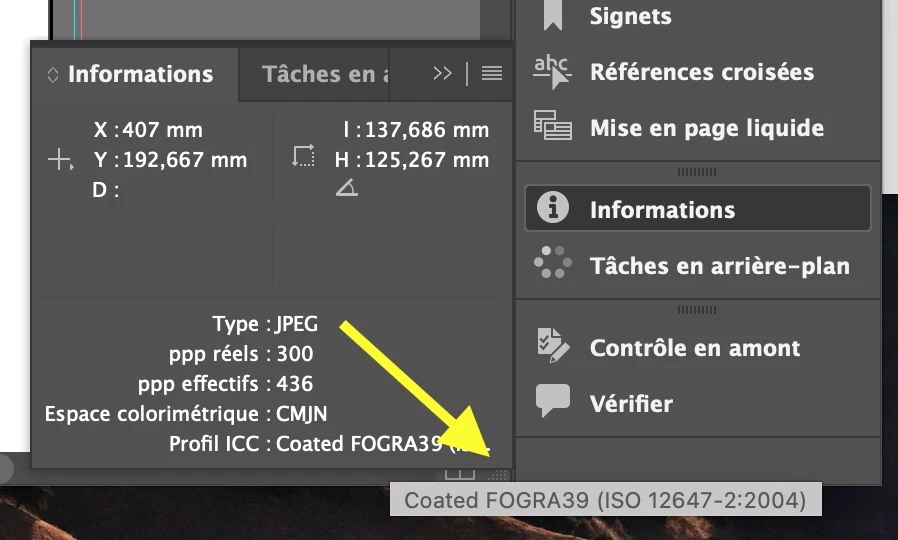
    Voici une capture écran des informations du lien. 😀

    Profil ICC est “Espace CMJN du document” alors que j’ai coché “CMJN: Conserver les numéros (ignorer les profils liés)” dans “Edition > Couleurs”.


    rob day
    Community Expert
    rob dayCommunity ExpertCorrect answer
    Community Expert
    May 28, 2026

    Right, so placed CMYK images are color managed with the InDesign document’s assigned profile, not its embedded profile, which is ignored.


    Check Edit>Assign Profiles… Your document’s profile, which is set to Coated FOGRA 39 is used to color managed placed images. What is the document’s print destination? Will it be printed on on coated paper on an offset press running to the Coated FOGRA 39 profile?