

dublove
Legend
December 26, 2024
Question

Problems encountered: Use a script to get the current mouse-selected rows and repeat them.

  • December 26, 2024
  • 3 replies
  • 878 views

Hello, everyone. Hello @Peter Kahrel.

I Use a script to get the current mouse-selected rows and repeat them.

I  Saw a posting above on "creativepro.com" , at the bottom of the page, where Peter Kahrel gave a solution at the end.
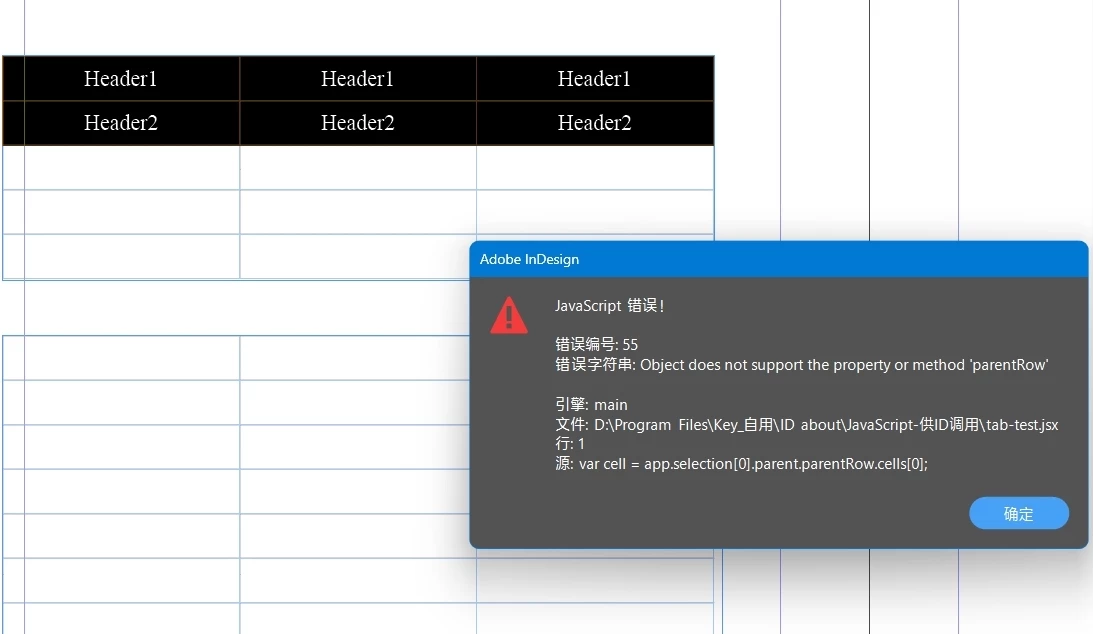
I mimicked one and for some reason it prompted an error.

https://creativepro.com/topic/get-selected-table-rows-with-extendscript/ 


Help me look at it.
Thank you very much.


Below is the code I cobbled together.  There's also an attachment.


var cell = app.selection[0].parent.parentRow.cells[0];
var myTable = cell.parent.parent;
var selectedRows = myTable.rows.itemByRange(cell,myTable.cells[-1]).select();
//var myTable = cell.parent
//firstRow = myTable.rows[0];

if (firstRow.rowType !== RowTypes.HEADER_ROW)
	{
	dupeTopRow(myTable);
	myTable.rows.add(LocationOptions.BEFORE, selectedRows);
/**
* duplicate the first row af a myTable 
* @ param the myTable 
* @ return void 
*/
function dupeTopRow(t){
    var newRow = t.rows.add(LocationOptions.BEFORE, t.selectedRows);
    var newCell = newRow.cells
    var lr = t.rows[1].cells
    for (var i = 0; i < newCell.length; i++){
        newCell[i].properties = lr[i].properties;
    };   
}
}
else{
alert("header exist")
exit ();
}


3 replies

dublove
dubloveAuthor
Legend
December 27, 2024

I used a dumb way to duplicate rows 1 and 2.
Couldn't this be done with just one function?


It would be easier if you could make a judgment based on the rows selected by the mouse.

Please guide me.


//dub header 
var cell = app.activeDocument.selection[0].parent
var myTable = cell.parent
firstRow = myTable.rows[0];
//duplicat row1
if (firstRow.rowType !== RowTypes.HEADER_ROW)
	{
	dupeTopRow(myTable);
	/**
* duplicate the first row af a myTable 
* @ param the myTable 
* @ return void 
*/
function dupeTopRow(t){
    var newRow = t.rows.add(LocationOptions.BEFORE, t.rows[0]);//past here
    var newCell = newRow.cells
    var lr = t.rows[1].cells//copy which row
    for (var i = 0; i < newCell.length; i++){
		newCell[i].properties = lr[i].properties;
    };   
}

//dublicat row2
dupeTopRow2(myTable);
function dupeTopRow2(b){
    var newRow2 = b.rows.add(LocationOptions.BEFORE, b.rows[1]);//past here
    var newCell2 = newRow2.cells
    var nr = b.rows[3].cells//copy which row
    for (var j = 0; j < newCell2.length; j++){
		newCell2[j].properties = nr[j].properties;
    };   
}


}
else{
alert("header exist")
exit ();
}


brian_p_dts
Community Expert
Community Expert
December 27, 2024

Can you just stick to one post/thread instead of creating several new posts around the same issue? It is difficult for us to track and manage. 

dublove
dubloveAuthor
Legend
December 27, 2024

Sorry, I will correct and avoid.
It doesn't seem to be the same problem, just using the same example code.

Robert at ID-Tasker
Legend
December 26, 2024

OK, I've checked the original code - you haven't read first line of Peter's reply:


"This works: select an an insertion point in any cell, then do this:"


But your selection is bunch of Cells.


dublove
dubloveAuthor
Legend
December 27, 2024

I read it wrong.
I thought that this would get the currently selected rows.

Robert at ID-Tasker
Legend
December 26, 2024

Too many parents:


var cell = app.selection[0].parent.parentRow.cells[0];


First "parent" - gets you the Table - so you need to drop it, because Table doesn't have "parentRow":


var cell = app.selection[0].parentRow.cells[0];


But then - you still have a problem:


And if you want to ping Peter - you need to make a space before "@".