
Bahia_Uno
Participant
October 3, 2017
Question

Problems with Clipping Paths - Detect Edges

  • October 3, 2017
  • 1 reply
  • 1600 views

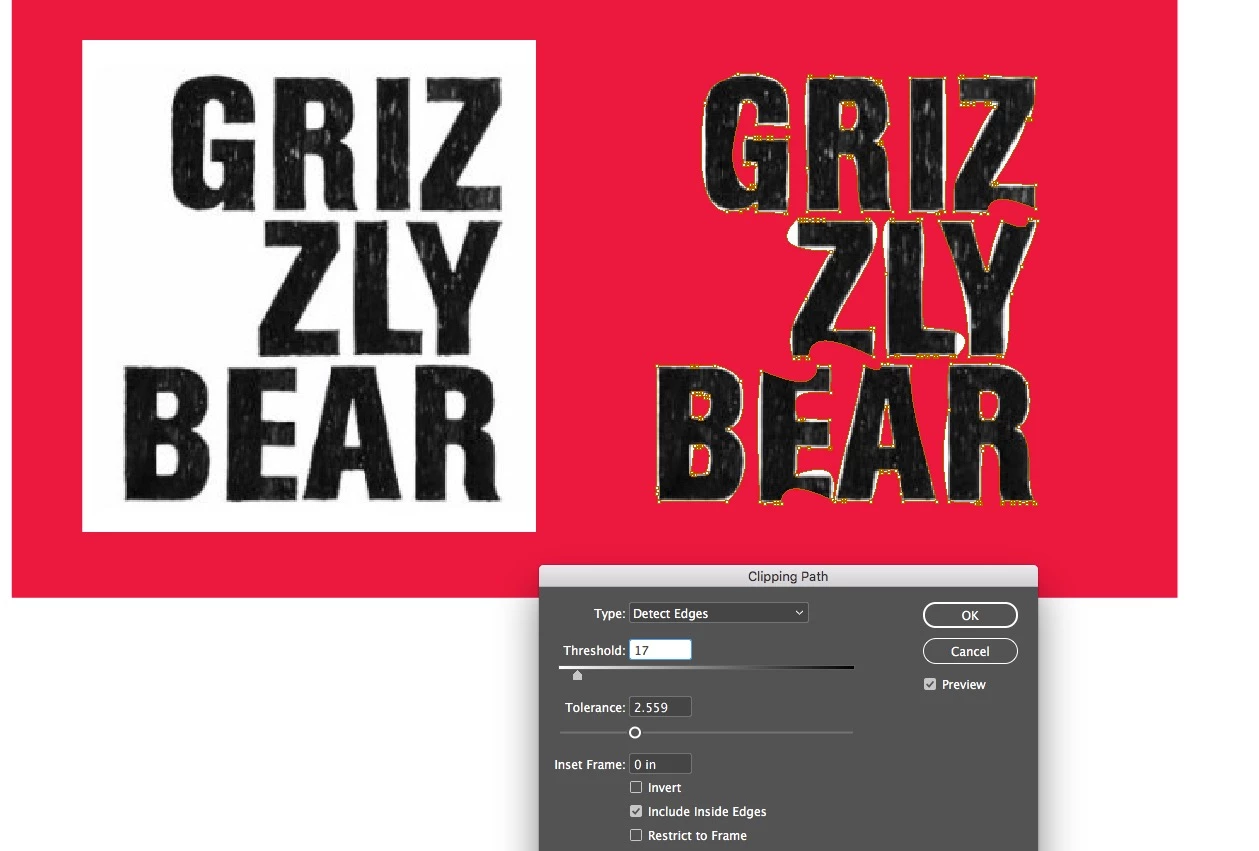
Is the Clipping Paths>Detect Edges really this bad or am I doing something wrong? I don't expect it to be perfect, usually I use this feature for mock ups. But it is always so so off, even with a totally white background with images that have very clean lines. The Threshold and Tolerance sliders don't help much either. See attached...
    This topic has been closed for replies.

    1 reply

    Barb Binder
    Community Expert
    Community Expert
    October 3, 2017

    Detect Edges is InDesign's answer to clipping masks, and it's not very good. If you have Illustrator skills you can greatly improve the edges using the anchors and the Direct Selection tool, but I highly recommend creating the transparency in Photoshop or Illustrator.

    If you need a hand let me know.

    ~Barb at Rocky Mountain Training
    Barb Binder
    Community Expert
    Community Expert
    October 3, 2017

    If it's just a mock-up, and it's a bit-map, then use the pencil icon in the Links panel to hop over to Photoshop, and just click the solid background with the Magic Eraser. Save, close and return to InDesign. That will be way better than InDesign's options.

    Or for more precision in Photoshop, save the text as an Alpha Channel or as a Path and access those from InDesign's Clipping Paths dialog box. Detect Edges just isn't the way to go.

    ~Barb

    ~Barb at Rocky Mountain Training
    Bahia_Uno
    Bahia_UnoAuthor
    Participant
    October 4, 2017

    Thank you! I usually end up doing just that- opening it up in Photoshop.