


Participant
October 31, 2024
Question

Problems with opening files after update to 2025

  • October 31, 2024
  • 1 reply
  • 712 views

After the usual annual update of Adobe InDesing some of my projects stopped opening.


When opening a project, a window appears for a split of a second, then closes and nothing happens. The project wont open and no other error message is displayed:
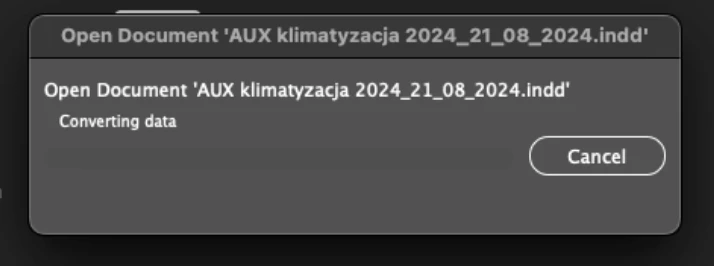


How can this be solved? The project is not corrupted - same issue happens on three different computers - macOS and Windows. Seems like the 2025 update messed up something? Other projects, files and such open just fine without any problems. Any possible solution to that?

This topic has been closed for replies.

1 reply

Vivek-Sharma
Community Manager
Community Manager
October 31, 2024

Hi, please provide the exact versions of your Windows and macOS? Additionally, if possible, share a screen recording showing the issue along with a sample file. This will help us investigate further and offer more effective assistance.


^VS

Participant
October 31, 2024

macOS Sonoma 14.6.1. The file is 88mb so it is rather not possible to share it. When trying to open the project a window appears for a split of a second (as seen above) trying to convert some data. The project can be open with InDesign 19.5, but 20.0 causes issues.


Abhishek Rao
Community Manager
Community Manager
November 1, 2024

Hi @Adam25207120v7zc,


Thank you for the information. I understand that this issue is quite concerning, especially since it’s happening across multiple computers.

If possible, could you share the affected file with us? Testing it on our end could help us identify the root cause of the problem.

Additionally, I found a community post that seems similar to the issue you’re experiencing: Unable to open InDesign file after 2025 update. You might find some helpful insights or solutions there as well.

Looking forward to your response!


Best,
Abhishek Rao