
Publish Online document
Hello friends,
I have created a Publish Online document that some of you kindly assisted with questions along the way.
It is used internally only. It is very complex, and I am wondering if I am using the best method. I'm basically using show/hide button functionality, but the show/hide functionality with this many buttons is very cumbersome. I looked into using MSO instead, but I believe that functionality can not be used in a Publish Online document. Is that correct?
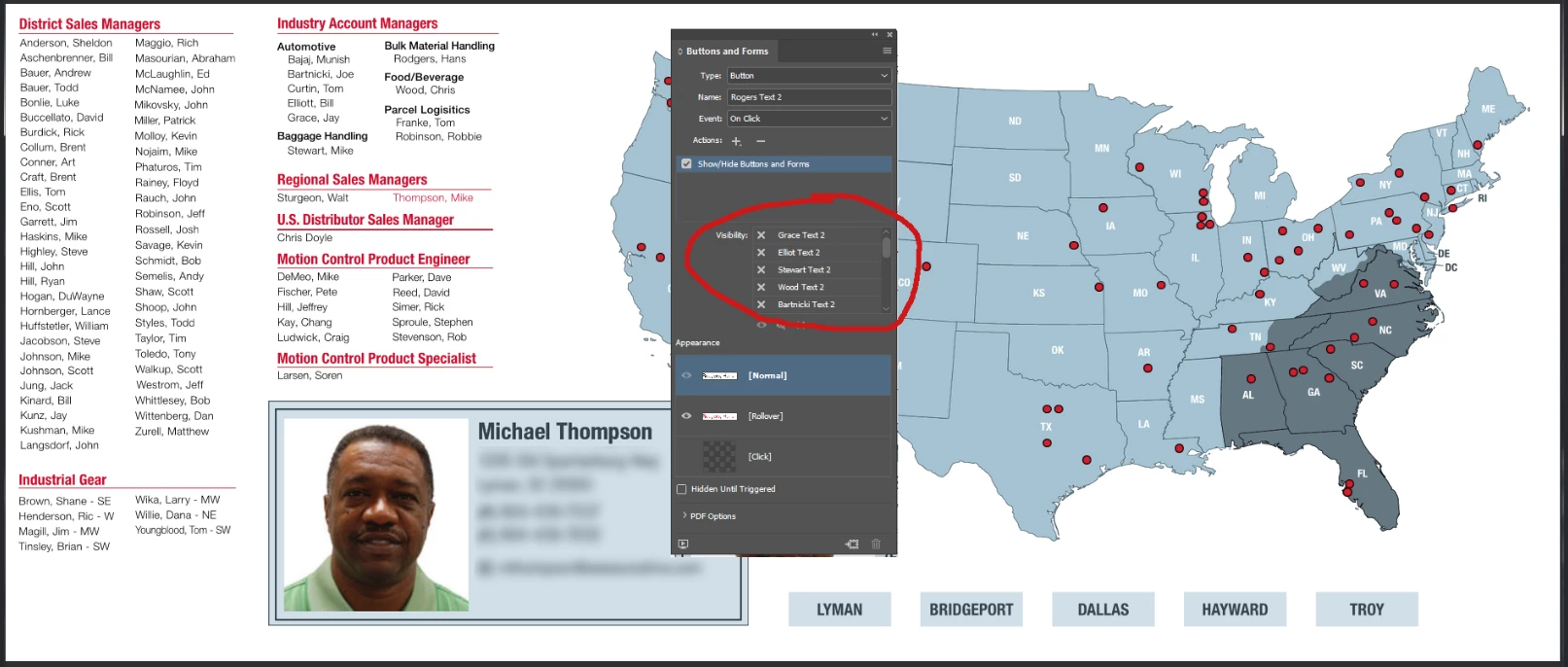
Basic functionality: By clicking on a name or red pin on the map, an employee info card is shown, and in some cases, the states/region that person covers is also shown. In all cases, those objects are buttons that are hidden until triggered. The problem is hiding previously displayed buttons (info cards/regions) when a new button is clicked. In the screenshot below, everything is basically a button - each name, each red dot, each info card, each state/sales region, etc. I know the solution is to hide all info cards except the one being clicked on, but that is slow, tedious, and cumbersome at best. I have dozens of buttons and the Show/Hide Buttons and Forms selector only displays five at a time. What a pain.
The only way I have found to clear the card and essentially start over is by use of an "X" that I placed top right in the info card place holder. It works, but it is not intuitive. The problem is, if you don't clear the box, the wrong card can be displayed, I think because of layering. I would rather have the previous buttons hidden when a new button is clicked.
I am limited to PDF for the most part, since I have no control over the recipients machines, and I can control updates by posting a new PDF when necessary.
I'm hesitant to share the files since there is personal info displayed, but wondering if anyone has ideas to tame this beast?
 AdChoices