Om Nath Jha
Legend
September 30, 2019
Question

Publish Online in InDesign

  • September 30, 2019
  • 4 replies
  • 2685 views

With Publish Online, you can publish a digital version of an InDesign document that works on any device, in any modern web browser, without the need to install a plug-in.  

You can follow these simple steps to publish your InDesign document:  

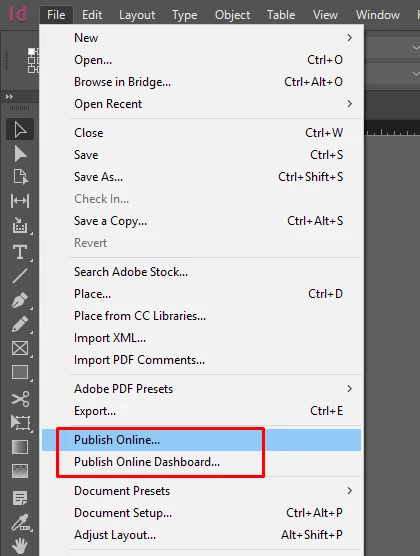
  1. Open the File menu > Publish Online  


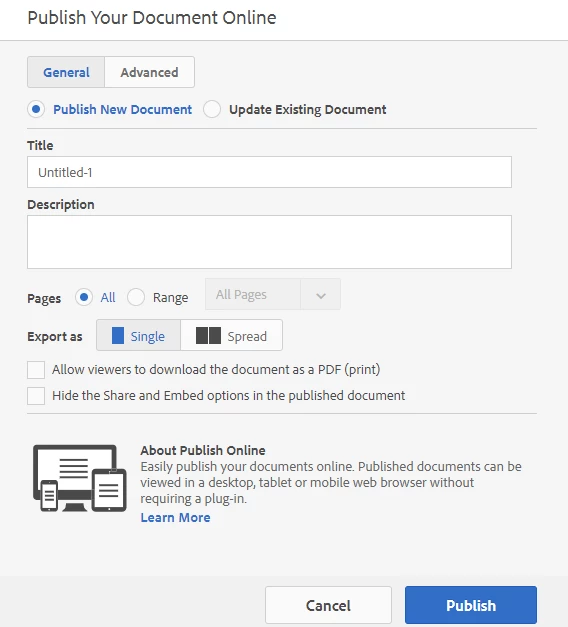
  1. Enter the details and click Publish:  


 Use the "Publish Online Dashboard" to manage your published documents. 


Check this help article for more details: https://helpx.adobe.com/in/indesign/using/publish-online.html 

This topic has been closed for replies.

4 replies

Participant
August 26, 2022

I like this interactive template best It really takes the Indesign interactive capabilities to next level. 

sandrat55165976
Participating Frequently
October 29, 2019

I want to start publishing online, but I would like to add the Google tracking ID to the InDesign document. I do not see where to input that. Can you please advise? Thaks so much!

Diane Burns
Inspiring
October 29, 2019

I'm not aware of any way to do this. Publish Online provides it's own analytics, which can be accessed via File menu > Publish Online Dashboard. See "Using the Publish Online Dashboard" here: https://helpx.adobe.com/indesign/using/publish-online.html

sandrat55165976
Participating Frequently
October 29, 2019

Yes, I think you're right.


I'm testing it out and finding that outwardbound links are active, but not internal ones, linking pages. Any ideas about that too? Thanks so much.

Participant
October 20, 2019

The version you are using is not the same version that is available on Adobe Cloud. Although AC lists InDesign 2019, the version does not have any templates or tools that your version of InDesign has. Why is that?

Diane Burns
Inspiring
October 20, 2019

I'm not sure, @mafulco, that I understand your question.

If you are referrring to the examples of Publish Online projects that I posted, these are all original designs by various designers, using InDesign. No templates. The tools are standard InDesign tools, as found on the CC version. 

Perhaps you could clarify?

Thank you.


Participant
October 21, 2019

Nevermind, I got it later. Us newbies have to be told that in order to bring up the workspace you must use the "Essentials" drop-down menu to see the tools, et al. Otherwise you will be stuck wondering why there are no tools when you open the app.


Diane Burns
Inspiring
September 30, 2019

And check out these examples of beautifully-designed interactive documents created with InDesign and Publish Online: http://bit.ly/PubOnCollection

Om Nath Jha
Legend
October 2, 2019
Awesome Diane!