
Participant
March 11, 2020
Question

QR code is not working with commonly used apps

  • March 11, 2020
  • 2 replies
  • 2637 views

Hi all,

I've created a QR code using Adobe InDesign. When I use my iphone camera, this works perfectly fine. However when I use the QR code scanner (top hit in App store) it opens only a blanc e-mail, without the predifined email / emailadres in it.


I have tried shortening the code/text, but this doesn't make a difference. My camera picks it up fine, but the app doesn't. Before I used a free QR generator website and it worked perfect, but due to safety requirements I would like to use Adobe InDesign for this.


I made a example QR-code for you to check out.
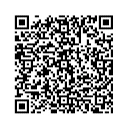
Does anyone know how to resolve this?


I hope you can help me out!

    This topic has been closed for replies.

    2 replies

    Ten A
    Community Expert
    Community Expert
    March 12, 2020

    I checked your code and format. It seems fine.

    Can you show the correct example made by web service?

    Legend
    March 11, 2020

    That QR code is massive, far too much text. And it cannot be checked online. Use a short URL.

    Laura00Author
    Participant
    March 11, 2020

    What do you mean by use a short URL? This doesn't work for a QR-code that makes you send an email right? 


    Would you say that this one below is still too big? Cause this one still doesn't work with the QR- app. I am just trying to understand why (even the massive QR code I created online does work en this one doesn't (always) work). 


    Thanks in advance! 

    Legend
    March 11, 2020

    The size and complexity of a QR code comes from the length of the text you put in. I assume what you put in is a URL mailto:something@somewhere?more options and more and more. Barcodes are sensitive, and testing and adjusting is a normal and required part of the process. It may work if you run it bigger. However, I suspect it's just a limitation of mailto: handling in the QR code scanner app. There are no real standards. If you don't use a URL shortening service, it's up to you to make the URL as short as possible. Some people do try to write an essay, and things are erratic.


    I can't read the one you posted either. Looks like it has been JPEG compressed. It has greys and not much detail. Perhaps you can tell us the URL string used in each case, since I can't read the barcodes.