
Inspiring
July 9, 2023
Question

question about book page numbering

  • July 9, 2023
  • 4 replies
  • 412 views

Hello,

1) I have a book with 3 chapters , and on each Book chapter /document, I have set a page numbering in the master page.

2) I have set my Indesign Book with these settings (start each chapter on an odd pages + add blank page) :
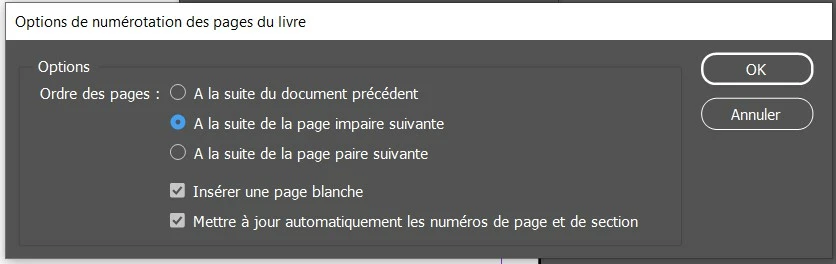
 

This setting had changed the page numbering.

Results :

1) in the exported PDF : I have a page numbering at the top of each page, but no page numbering for the blank pages. Why ?

2) if I go to see in each chapter/document, I see the blank pages, but for these blank pages there is no master page applied. Why ?

Even if I synchronize, the blank pages does not show any page number/ no master page applied on the blank page.


This topic has been closed for replies.

4 replies

Barb Binder
Community Expert
Community Expert
July 10, 2023

Hi Pierre:


The exception to Peter's answer is in technical document layout, where the words "This page intentionally left blank" are frequently added to the otherwise empty left pages added at the end of chapter so that the next chapter can begin on a facing page. They normally don't have running heads or page numbers (but sometimes people do include them).


If you decide to add those words, create a parent page for it in your template and assign them manually to the blank pages that are still there at the end of the editing cycle. 


~Barb

~Barb at Rocky Mountain Training
Inspiring
July 9, 2023

Usually, in a Book, is it necessary to have a number on the blank pages (the blank pages between two chapters) ?

Peter Kahrel
Community Expert
Community Expert
July 9, 2023

No, usually blank pages are entirely blank, including no page numbers.

Inspiring
July 9, 2023

If I understand well, about the blank pages automatically added by the Indesign Book, InDesign is unable to apply automatically the document  master page on these added blank pages, and I am obliged to do it manually.

D. Schulte
Participating Frequently
July 9, 2023

That is pretty much the gist of it. Just add the blank pages yourself and assign a master page. The advice from Eugene Tyson to apply a preflight with a check for multiples of 4 is also highly recommended.

Community Expert
July 9, 2023

When it adds the blank page it's not the Parent Page - it's a page with the None.


If you don't want this - then don't choose Add Blank Pages - turn this off.

And manually insert your blank pages using the Parent Pages.


You can setup a preflight check to check if files are multiples of 4 - which would mean you will be alerted during a preflight check that you probably need to add a blank page.