Inspiring
April 15, 2022
Question

question about links

  • April 15, 2022
  • 3 replies
  • 241 views

Hello,

On the screenshot here you can see I have two missing links.
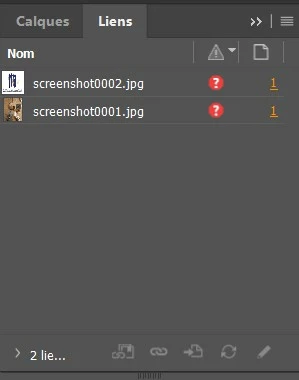
 

I would like to delete these links in the link panel. How to do this ?

This topic has been closed for replies.

3 replies

rob day
Community Expert
Community Expert
April 15, 2022

There’s also the Go To Link icon at the bottom of the panel, and as a menu item in the flyout—click the Go To Link icon and the link will be displayed and selected.

Willi Adelberger
Community Expert
Community Expert
April 15, 2022

Klick on the page number, in you screen shot it is the underlined 1, and delete the content which refers to the asset outside of InDesign.

Of course, you could link it again and embe it from the panel menu. But I would not recommend to do so, as it is increasing the file size of the indd document and may cause stability problems.

Peter Spier
Community Expert
Community Expert
April 15, 2022

You must delete the content from the page to delete a link. The panel says these are both on Page 1, so go to that page, select the two frames that have the screenshots in them and delete either the content from the frames or the frames themselves.