Inspiring
March 28, 2022
Question

question about sub-columns

  • March 28, 2022
  • 11 replies
  • 1482 views

Hello,

About this sub-column here, I would like to insert a vertical line between the two sub-columns. How to do this ?
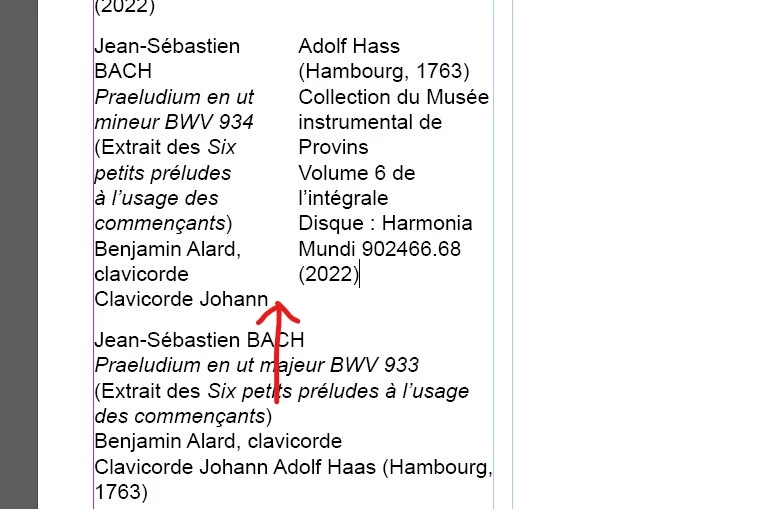
 

This topic has been closed for replies.

11 replies

Inspiring
April 1, 2022

Hello,


Between the sub columns here, I would like a non printable vertical guide (made of 2 vertical lines) : 


A non printable vertical guide between sub colomn, like this : 


How to do this between the sub-columns ?

jmlevy
Community Expert
Community Expert
April 1, 2022

This feature does not exist. If you really want it, you have to cheat, using paragraph shading as Uwe explained and tick the checkbox “ne pas imprimer ni exporter”


Inspiring
March 29, 2022

Ok, now I have read your previous message, and here are my settings.

Left :

And right : 


jmlevy
Community Expert
Community Expert
March 29, 2022

Why did you choose an offset of 6,939 mm? Is it the sum of the left paragraph offset (1,3 mm) plus the leading? If I do maths, 6,939 mm - 1,3 mm equals to 5,639 mm. That should be the leading. If I convert 5,639 mm in points, I find 15,985 pt. Is that your leading?

Inspiring
March 29, 2022

Offset bottom 7mm :


Offset bottom 8mm :


Whatever I choose (7mm or 8mm), I have all the time this level difference at the bottom. 

jmlevy
Community Expert
Community Expert
March 29, 2022

You didn't read my previous answer…

Inspiring
March 29, 2022

If I put 2mm on all side, I have a more important level difference at the bottom :


jmlevy
Community Expert
Community Expert
March 29, 2022

Yes, of course: I didn't notice that the 2 subcolumns had different heights! So, you have to make a fine tuning to find the right offset to get the same alignment.

jmlevy
Community Expert
Community Expert
March 29, 2022

Actually, there is an easy way to adjust the bottom alignment, since InDesign knows maths:

  • Start to adjust the bottom offset of the longest paragraph
  • For the shortest paragraph, you just use the same offset PLUS the amount of the paragraph leading. If the longest paragraph has 2 lines more than the shortest, multiply the leading by 2.  


In my screnshot, the bottom offset is 6, 939 mm. I just typed 2 mm + 15 pt (the leading value) and InDesign converted this in mm.

Inspiring
March 29, 2022

Here is my settings for the left sub-column :


And here is the setting of the right sub-column and the final result.

I don't understand why the bottom border of the right sub-column is not at the same level as the bottom border of the left sub-column.


jmlevy
Community Expert
Community Expert
March 29, 2022

Look at your screenshots, “décalage du bas”: one has 2 mm and the other 7 mm

Inspiring
March 29, 2022

I would like to create a border surrounding the two sub-columns, like this (in red). How to do this ?


jmlevy
Community Expert
Community Expert
March 29, 2022

If you have a paragraph break at the end, as on your exemple, use paragraph borders with a border on the top, the bottom and the left side for the paragraph of the left column and a border on the top, the bottom and the right side for the paragraph of the right column.

Community Expert
March 28, 2022

Hm. I still think about a solution with a paragraph border.

Why don't we try this together with a column rule that obscures the border?


Text frame options column rule is set to 0 Pt [Paper]:


Text frame options column rule is set to 7 Pt [Paper]. Now the column rule of the text frame will obscure the paragraph border we do not want:


Yes, that will work as long as the text frame's background is the color of the text frame's column rule.

So, jmlevy's solution will win!


Download the document from my Dropbox account:

https://www.dropbox.com/s/tdy6vptgrjqu3bw/SplitColumn-ParagraphBorder-Dotted-ColumnRule-SAMPLE-2022.indd?dl=1


Regards,
Uwe Laubender

( ACP )

Inspiring
March 28, 2022

Here are my settings in the shading panel :


If I decide to choose another vertical line (by example a dotted vertical line), how to do this in the shading panel ?

jmlevy
Community Expert
Community Expert
March 28, 2022

You can't. Use a paragraph border in this case. The Uwe's solution (using paragraph shading instead of paragraph border) is a trick to avoid to get rules on the side of each column.


You can also choose a differenbt solution: you can anchor a vertical rule where you want. But in this case, this rule will not automatically adjust its length if the text is modified.

Inspiring
March 28, 2022

I have first shown hidden characters, and at the bottom of the left sub-column I have seen I had not the "blue return symbol", so I pressed on return key. And I have clicked on the left sub-column text and set the right border on 1pt, and also used a text offset of -1mm.


I have noticed that if there is no blue return symbol at the bottom left sub-column, I obtain 2 right borders instead of one at the center :

Community Expert
March 28, 2022

Yes. That's the issue with paragraph rules.

See into my InDesign document that you can download from my Dropbox account where I used paragraph shading.


Regards,
Uwe Laubender

( ACP )

Community Expert
March 28, 2022

Wasn't that discussed before in the forum?

My answer was to use paragraph shading for all paragraphs in the split column paragraphs where the visibility of the shading that imitates a rule is restricted to the text frame or column. I would love to do this with paragraph rules, but there is no option to restrict it to the column or text frame.


Download my sample document from my Dropbox account:

https://www.dropbox.com/s/vifewaqqj22vbfh/SplitColumn-VerticalRule-ParagraphShading-SAMPLE-2022.indd?dl=1


Regards,
Uwe Laubender

( ACP )

jmlevy
Community Expert
Community Expert
March 28, 2022

That's very clever, Uwe! Of course, your solution is the best!

Community Expert
March 28, 2022

Here I disagree.

At least a bit. There is no optimal solution.

Both of our solutions, using paragraph rules vs paragraph shading do have some issues with flexibility.


Regards,
Uwe Laubender

( ACP )