jamieb35960912
Participating Frequently
March 14, 2021
Answered

Question on nested styles and paragraphs

  • March 14, 2021
  • 4 replies
  • 428 views

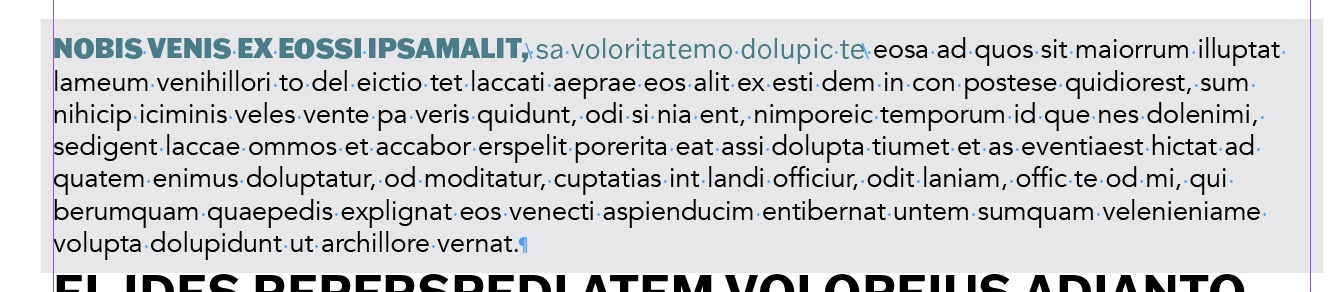
Hello! I'm working on a sample document to prepare for an upocoming project and am adding nested styles. I'm using "end nested style" characters for the header and subhead which works fine until I add paragraph returns.


I've also tried creating paragraph returns before applying nested styles. I want to have a header, sub head and then multiple paragraphs below that but whenever I do a paragraph return, all of the copy turns to the header 1 character style.


Is it not possible to do nested styles with multiple paragraphs? I've also tried using "through" instead of "up to" and em and en spaces as well as forced line break. Anyone encounter this? Not sure if this is a basic question but have been feeling stuck trying to work this out 

Here's what I have before adding paragraphs ^ 
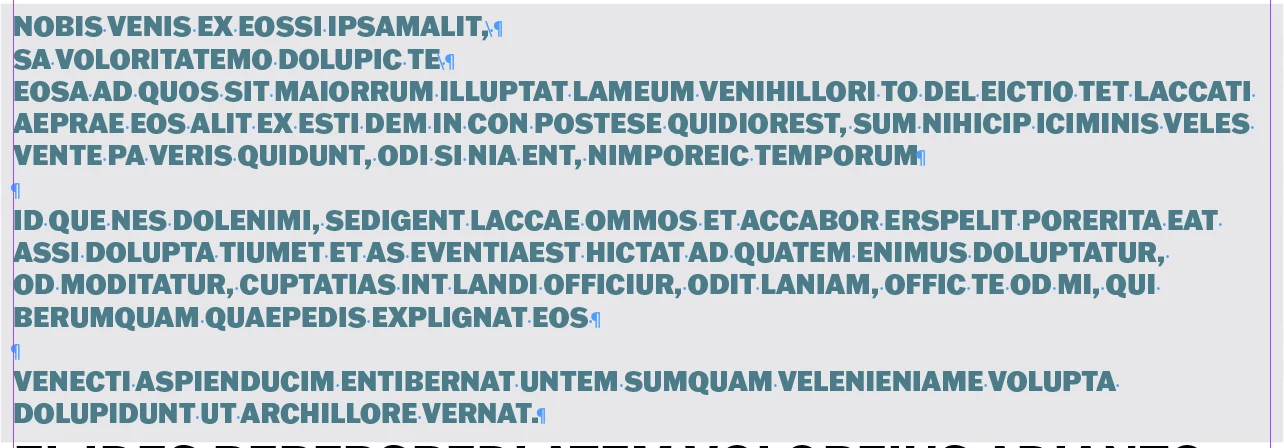
Once I add the paragraphs ^ 

This topic has been closed for replies.
Correct answer Barb Binder

If I were @jamieb35960912 I would create three paragraph styles, and no nested styles. 

  • Quote Header1 (next style set to Quote Header2)
  • Quote Header2 (next style set to Body)
  • Body (next style set to same style)

Select the three paragraphs, right click on Quote Header1 in the Paragraph Styles panel and choose Apply Style "Quote Header1" then Next Style to assign all three at one time.


If you really want to use the nested styles, add line breaks (Shift+Enter) to your first example and not hard returns (Enter) to start the new lines. And in that case, you won't need the End Nested Style character. Just choose Forced Line Break instead as the stopping point for the nested styles.


~Barb


4 replies

Barb Binder
Community Expert
Barb BinderCommunity ExpertCorrect answer
Community Expert
March 14, 2021

If I were @jamieb35960912 I would create three paragraph styles, and no nested styles. 

  • Quote Header1 (next style set to Quote Header2)
  • Quote Header2 (next style set to Body)
  • Body (next style set to same style)

Select the three paragraphs, right click on Quote Header1 in the Paragraph Styles panel and choose Apply Style "Quote Header1" then Next Style to assign all three at one time.


If you really want to use the nested styles, add line breaks (Shift+Enter) to your first example and not hard returns (Enter) to start the new lines. And in that case, you won't need the End Nested Style character. Just choose Forced Line Break instead as the stopping point for the nested styles.


~Barb


~Barb at Rocky Mountain Training
jamieb35960912
Participating Frequently
March 25, 2021

Thank you! I'm trying to figure out re-applying to the other paragraphs but this worked better than nested styles for the initial paragraph I applied it to

jmlevy
Community Expert
Community Expert
March 14, 2021

You need 2 different paragraph styles: the first one as you set it up, with nested styles and another one, without the nested styles. Use the “next style” feature to automatically switch between the first one (with the nested stle) and the following.

Community Expert
March 14, 2021

End nested style is a specific character you add to the text where you want the end nested style to end.

End Nested Style Character

Extends the nested style up to or through the appearance of the End Nested Style character you insert. To insert this character, choose Type > Insert Special Character > Other > End Nested Style Here.

pixxxelschubser
Community Expert
Community Expert
March 14, 2021
  • The nested style is defined in the paragraph format and always affects the entire paragraph if there is no separator.
  • The nested style starts when the paragraph starts.
  • The nested style ends when the paragraph ends.


If you don't have a End Nested Style character (your! separator) in this paragraph, the formatting of the character style is applied through up to the end of the paragraph.