
Participant
February 13, 2021
Answered

Quotation mark split from text

  • February 13, 2021
  • 2 replies
  • 579 views

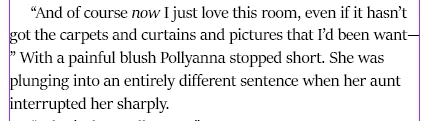
Could anyone help me understand why InDesgin is separating a closing quotation mark from the text before it (please see screenshot below). It seems to be the dash that's throwing it off, but I thought there was some type of internal programming that would never allow quotation marks to be separated from text like that. I've never run into this before and have no idea how to fix it. Any help would be greatly appreciated!


This topic has been closed for replies.
Correct answer Barb Binder

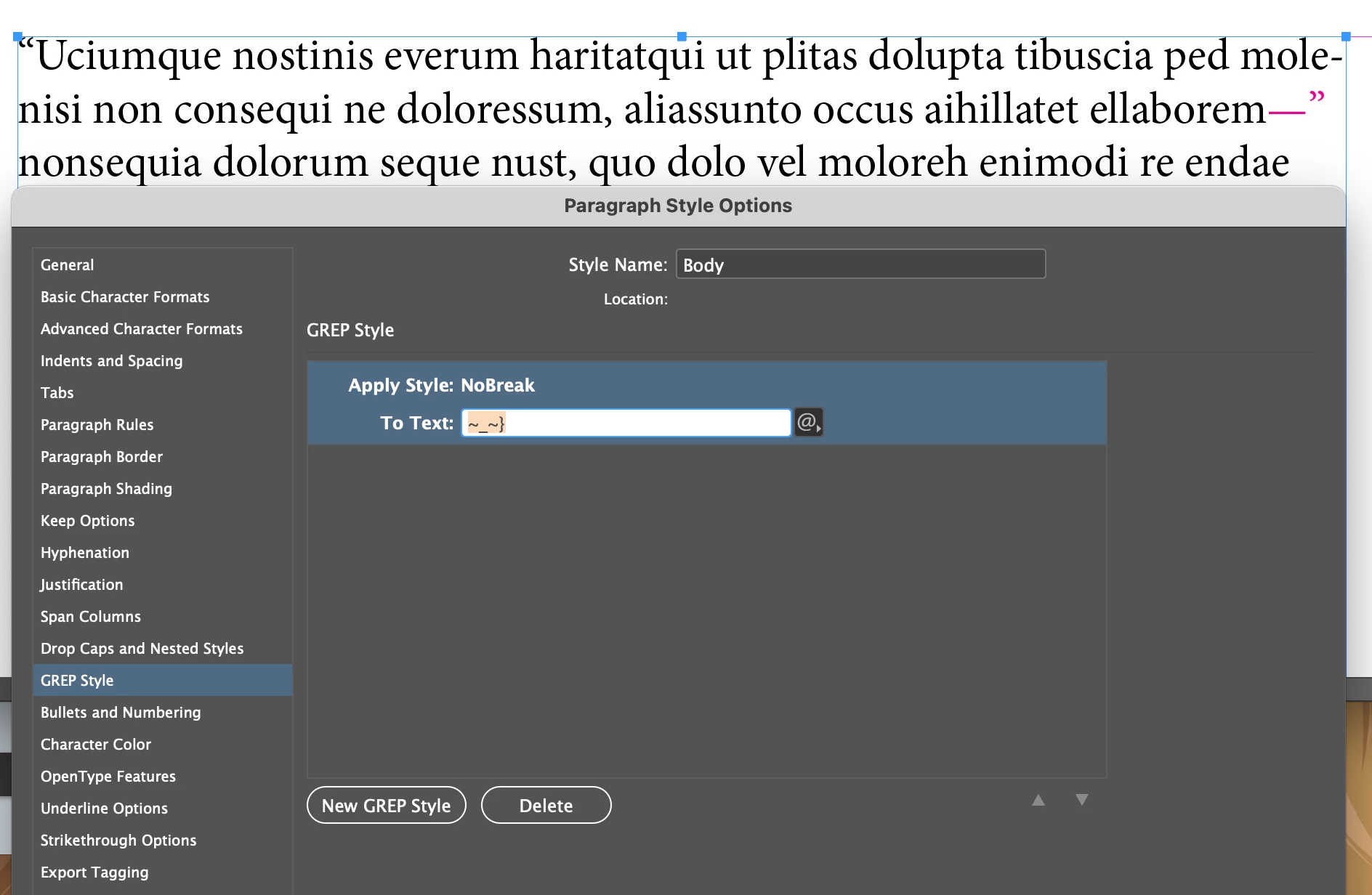
You can fix this universally with a GREP style. I created a character style called NoBreak (No break on and I used a color so that you can see it), and assigned it to an em dash followed by a right quote. ~_~}


If you add this to your Body style, then InDesign will automatically keep these two characters together for all body paragraphs, and all paragraph styles based on body paragraphs.


~Barb 

2 replies

Barb Binder
Community Expert
Barb BinderCommunity ExpertCorrect answer
Community Expert
February 15, 2021

You can fix this universally with a GREP style. I created a character style called NoBreak (No break on and I used a color so that you can see it), and assigned it to an em dash followed by a right quote. ~_~}


If you add this to your Body style, then InDesign will automatically keep these two characters together for all body paragraphs, and all paragraph styles based on body paragraphs.


~Barb 

~Barb at Rocky Mountain Training
jmlevy
Community Expert
Community Expert
February 13, 2021

Are you sure there is no space between the dash and the closing quotation mark? If yes, a workaround could be to select the word “want” the dash and the quotation mark and apply “no break”

Do not be confused by the alt I shortcut, it is a custom one.

Participant
February 15, 2021

Thank you, jmlevy. Yes, I'm certian there is no space after the dash. I will go the "no break" route. There are many dashes like that in this book, so hopefully I don't have any more instances where there is separation. Thanks again!

Bojan Živković11378569
Community Expert
Community Expert
February 15, 2021

It is good idea to create character style No break. All my new documents have bold, italic, no break, hyperlink character styles before anything else.