
Participant
November 14, 2025
Answered

Random characters throughout my document

  • November 14, 2025
  • 3 replies
  • 91 views

I am encountering an annoying problem with InDesign lately. I have SAVE AS my document and when reopened, even after a PC restart (Win 11), the document is filled with random characters in text, bullets, tables, hyperlinks. Original documents from WORD 365 for Win not linked to ID but pasted.


This happens when working from home on a connected (not wi-fi) network and in the office.


 Example below:
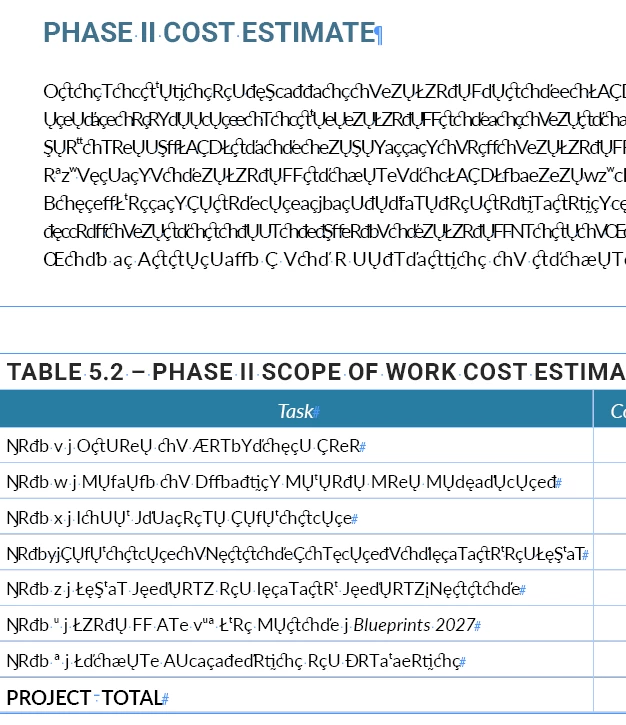
Is there a workaround besides having to restart the laptop again and again? Any help would be appreciated. Many thanks in advance.

Correct answer Abhishek Rao

Hi @Marie29007679rwta,


Thanks for sharing the details and screenshots. Could you please confirm if this issue happens only with this particular document or with others as well? Also, let me know where the file is saved, locally on your system drive, in the cloud, or on a remote location. Was this document originally created in an earlier version of InDesign, or was it made in version 21.0 itself, and the issue appears only after reopening it? Once the document opens and looks correct, please save it as an IDML file, then reopen that IDML and resave it as a new INDD file. Test with the new INDD to see if the issue still occurs. You can also try copying the content into a new blank document and saving it locally (not on a synced or shared drive) to check if the behavior persists. Please share your observations after testing, so I can review this further.


Looking forward to your update.

Abhishek

3 replies

Abhishek Rao
Community Manager
Abhishek RaoCommunity ManagerCorrect answer
Community Manager
November 14, 2025

Hi @Marie29007679rwta,


Thanks for sharing the details and screenshots. Could you please confirm if this issue happens only with this particular document or with others as well? Also, let me know where the file is saved, locally on your system drive, in the cloud, or on a remote location. Was this document originally created in an earlier version of InDesign, or was it made in version 21.0 itself, and the issue appears only after reopening it? Once the document opens and looks correct, please save it as an IDML file, then reopen that IDML and resave it as a new INDD file. Test with the new INDD to see if the issue still occurs. You can also try copying the content into a new blank document and saving it locally (not on a synced or shared drive) to check if the behavior persists. Please share your observations after testing, so I can review this further.


Looking forward to your update.

Abhishek

Participant
November 14, 2025

Good afternoon, Abhishek.

  • The file was originally created in InDesign previous version (2025 pre-September 2025 whatever that number was).
  • This has happened in more than one document. 
  • The ID files and package are stored in the Microsoft OneDrive cloud as we are not permitted to store anything in Adobe.
  • This file contains text from Word, copied (styles removed) and pasted (not linked) as well as entire PDF files that are placed (Appendix chapters). Those are throwing up error messages for 'fronts not found.'
  • Some current fonts that I have used from the beginning are reverting to other fonts as well (true type).
  • Every time new items are added, I am saving "save as" and when things are really complex, I re-package all the material.


We are working with consultants to produce the final document and we do not have the original material. I am doing the best I can to handle this project with 18+ years under my belt.


The new IMDL looks very good. No font problems that I can see--it came right up. I have re-saved it as an indd file (is that OK?).


Barb Binder
Community Expert
Community Expert
November 14, 2025

Thank you and...


...did you note when this started happening, or has it always been this way?


~Barb

~Barb at Rocky Mountain Training
Barb Binder
Community Expert
Community Expert
November 14, 2025

HI @Marie29007679rwta:


What version of InDesign are you using? Help > About InDesign: the version number is shown directly below the title.


And did you note when this started happening, or has it always been this way?


~Barb

~Barb at Rocky Mountain Training
Participant
November 14, 2025

I have no new updates today for any Adobe app.