



VanillaGorillaNB
Participant
October 6, 2026
Answered

Random Underlined Text After PDF Export

  • October 6, 2026
  • 5 replies
  • 30 views

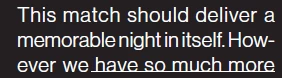
I have created a small magazine in InDesign and am ready to export it to a PDF for the printer. When I export it using the Adobe PDF Presets High Quality Print a random sentence comes out underlined. I have checked the text in InDesign multiple times and there’s no extra formatting on it so I’m not sure why this is happening.
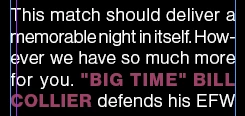
This is the text inside InDesign
This is from the PDF

I have played around with all types of different settings and it always exports the same. Anyone ever have an issue like this?

    Correct answer VanillaGorillaNB

    I figured it out. It was actually a line that was drawn and I didn’t realize it. I removed the text and the line was still there so that was how I ended up figuring it out.

    5 replies

    VanillaGorillaNB
    VanillaGorillaNBAuthorCorrect answer
    Participant
    October 7, 2026

    I figured it out. It was actually a line that was drawn and I didn’t realize it. I removed the text and the line was still there so that was how I ended up figuring it out.

    BobLevine
    Community Expert
    Community Expert
    October 7, 2026

    Did you check for a character style?

    m1b
    Community Expert
    Community Expert
    October 6, 2026

    Hi ​@VanillaGorillaNB first thing to check would be hyperlinks. They often come across when importing text from another app.


    Go to menu Window > Interactive >Hyperlinks to show the Hyperlinks panel. If you see any hyperlinks that you don’t want, especially with the source text that you see underlined, click it in the panel and delete it.

    VanillaGorillaNB
    Participant
    October 6, 2026

    Thank you for the advice, I was able to see that there were hyperlinks and I deleted them. I re-ran the export but it did not fix the problem.

    m1b
    Community Expert
    Community Expert
    October 7, 2026

    Hi ​@VanillaGorillaNB, have you tried to remove the unwanted text formatting now? It was probably the hyperlink that was stopping your normal formatting from happening. Try applying your paragraph style again (alt/option click it in the paragraph styles panel). It should be normal text now, free editable.