
timz67519437
Inspiring
February 9, 2024
Question

Recent Issues (new doc and links panel)

  • February 9, 2024
  • 1 reply
  • 305 views

With this latest update to InDesign 19.1, I've had two issues.


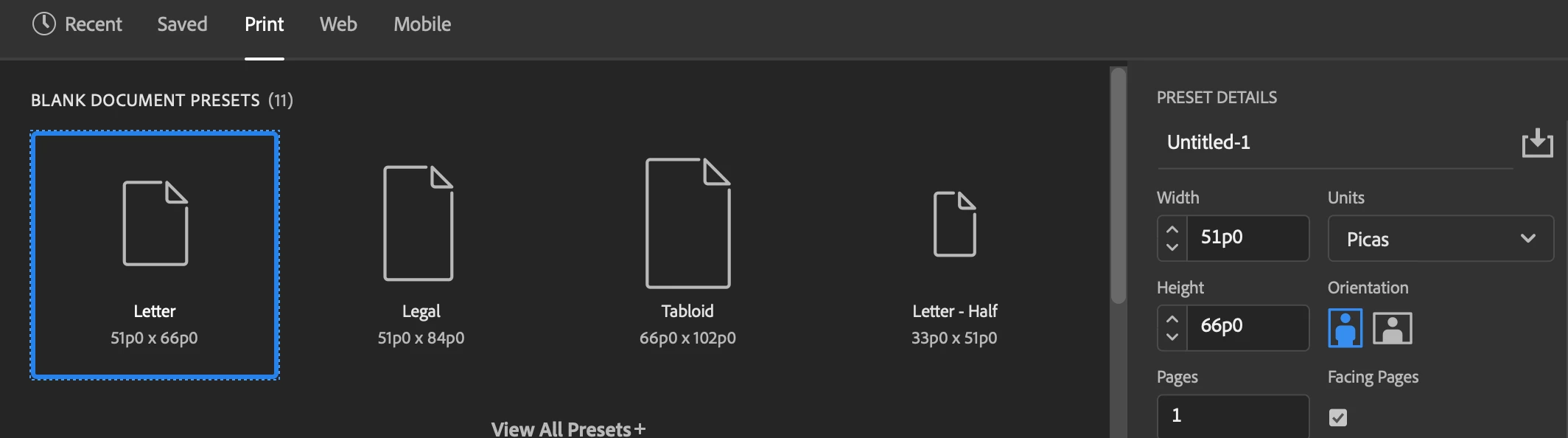
1. The New document panel (for Print, Saved and Recent items) defaults to Picas for units, even though I have ID's preferences set to inches. The Web and Mobile section still display pixels. I have to switch to inches everey time I make a new doc. I never had to do that before.


2. The Links panel no longer displays a little yellow warning triangle next to an image that has been updated, so I can't see when something has been updated in the panel.

And, of course, Adobe has not yet implemented an auto-update Links feature in the app, even though it's been requested by a lot of people.


Anyone else experiencing these issues?
This topic has been closed for replies.

1 reply

Steve Werner
Community Expert
Community Expert
February 9, 2024

I'm not experiencing either of these issues.


To see the presets in Inches, close all documents and set the Units. Then Inches will appear in all new documents (it won't change documents which are already set with different units.)


I still see warning triangles when images need to be updated.


Perhaps it would help if you told us more about your system: Please tell us what operating system (exactly) you're running. Please tell us (exactly) what InDesign version you're using.

timz67519437
Inspiring
February 9, 2024

I had to uninstall ID and it's preferences and reinstall it from scratch. Everything is working correctly now. Thanks for your reply. 

Steve Werner
Community Expert
Community Expert
February 9, 2024

i'm glad you figure it out!