
Inspiring
Mar 12, 2025 3:40 PM UTC
Question

Recurring Adobe InDesign crash

Hello everyone! For the past few days, I've been getting this alert in InDesign that keeps coming back. I've uninstalled and reinstalled InDesign, cleared preferences, and emptied the caches in user/name/library/cache/Adobe_Indesign, but none of this works. Do you have any ideas on how to fix this? Thanks in advance for your answers. 🙂
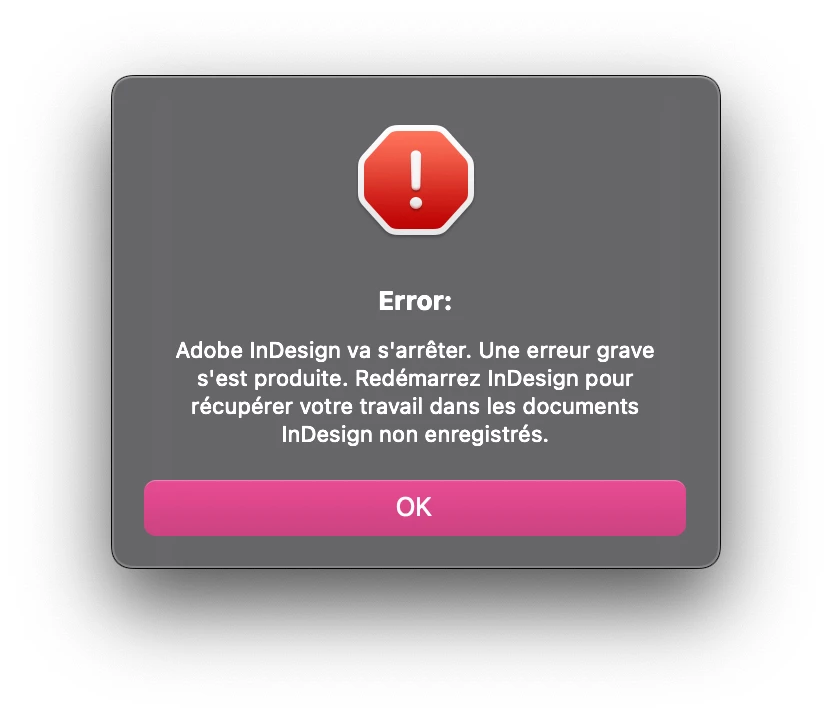
25 replies

Abhishek Rao
Community Manager
Community Manager
Mar 12, 2025 5:45 PM UTC

Hi @Sylvain Guizard,


Thanks for sharing the details! I see you've already tried resetting preferences and clearing caches as suggested by the expert. Since the issue happens even when no files are open, could you confirm if the app crashes itself, and if you see the Adobe Crash Reporter dialog? If so, please submit the crash report with your email address included, and DM me the email you used, so I can check the logs and get it investigated. Reference: Adobe Crash Reporter.

Additionally, could you test if the issue persists in Safe Mode? This will help rule out any third-party software conflicts. Reference: Apple Safe Mode.

Also, please confirm the exact version of InDesign you're using and the details of your OS. Looking forward to your update!


^

Abhishek

Translate
Inspiring
Mar 16, 2025 3:24 PM UTC

Thanks Abhishek. I'm currently away from InDesign, but I'll keep an eye on that in the next week. 🙏

Translate
Abhishek Rao
Community Manager
Community Manager
Mar 17, 2025 6:49 PM UTC

Hi @Sylvain Guizard,


Hope you're doing well! Just checking in if you are still facing the issue, or has it been resolved? Let me know whenever you get a chance. 


^

Abhishek

Translate
jmlevy
Community Expert
Community Expert
Mar 12, 2025 3:52 PM UTC

I've cleared preferences

De quelle façon ? Il faut relancer l'application tout en appuyant simultanément sur Maj, Ctrl, Alt [Windows], Maj, Ctrl, Alt et Cmd [Mac] jusqu'à l'apparition du message demandant confirmation. Ou bien, à partir de la version 2024, on peut faire cette opération via les préférences :

Translate
Inspiring
Mar 12, 2025 3:54 PM UTC

Oui, c'est ce que j'ai fait. Avec les touches à l'ouverture de l'application. Ça n'a aidé en rien, malheureusement.

Translate
jmlevy
Community Expert
Community Expert
Mar 12, 2025 4:27 PM UTC

Tu as bien obtenu un message demandant confirmation ? 

Translate