Participant
April 18, 2024
Answered

Reference an anchored frame in a table cell

  • April 18, 2024
  • 5 replies
  • 671 views

I have a large table imported from excel with embedded images in every alternative table row.


The images are in anchored frames in the table cells. I want to resize these frames and make the images match the new height. I can reference the table cell but not the anchored frame. Does anyone know how to go about this?

This topic has been closed for replies.
Correct answer m1b

Hi @gnuklear, here's a quick little script to apply an Object Style to every graphic in a selected table. The idea is that you set the Size and Position and/or Frame Fitting Options of the object style. In the script, edit this line, replacing Table Graphic with the name of your object style:

var objectStyleName = 'Table Graphic';

Example Object Style settings:
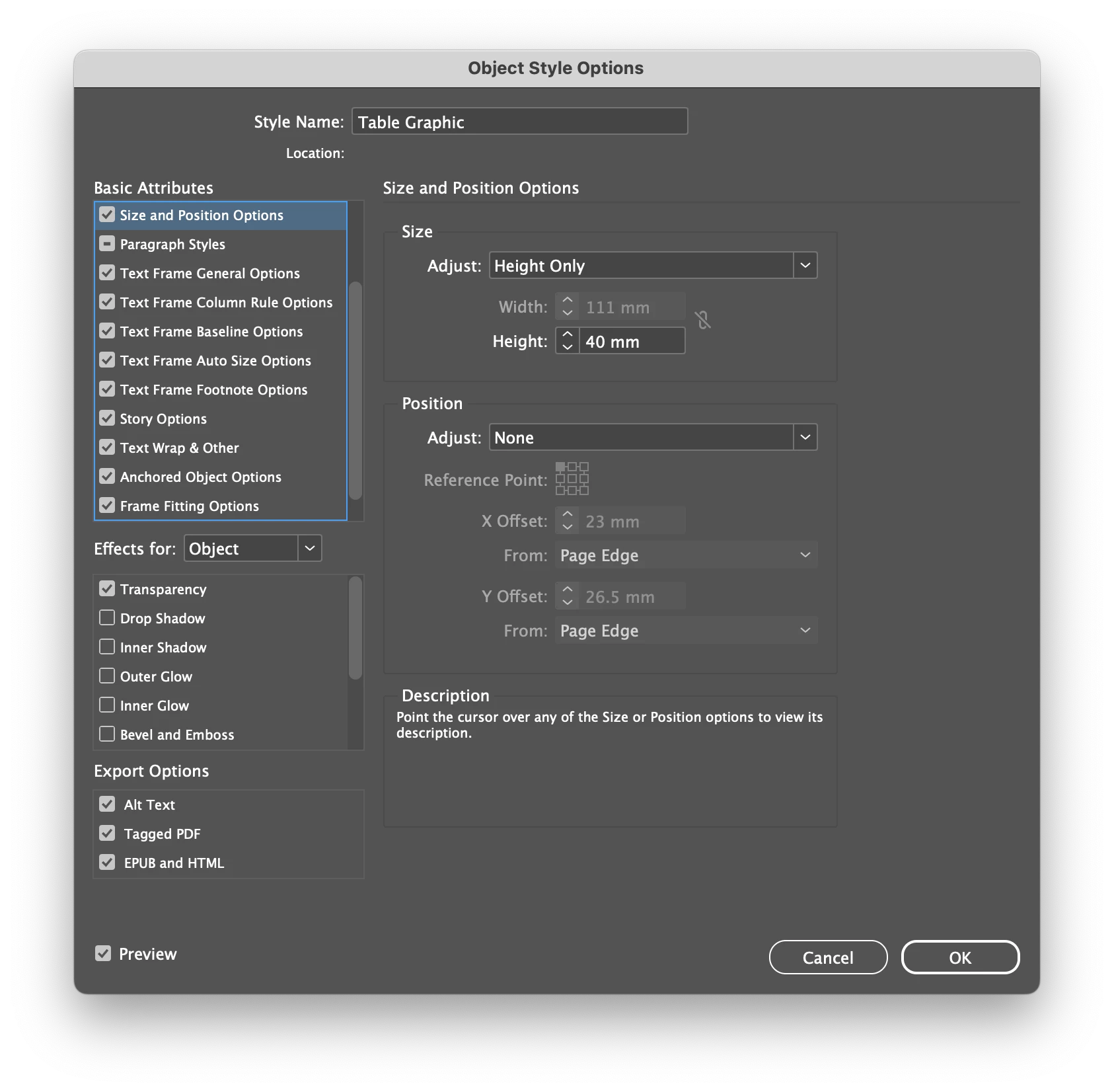
You will see that the script uses the exact suggestion that @Laubender made. Let me know how it goes.

- Mark


/**
 * @file Apply Object Style to Table Graphics.js
 * 
 * Applies the specified object style to all graphics of selected table(s).
 * 
 * @author m1b
 * @discussion https://community.adobe.com/t5/indesign-discussions/reference-an-anchored-frame-in-a-table-cell/m-p/14562435
 */
function main() {

    // you must edit this to match your object style
    var objectStyleName = 'Table Graphic';

    var doc = app.activeDocument,
        items = doc.selection;

    if (0 === items.length)
        return alert('Please select some page items and try again.');

    var objectStyle = doc.objectStyles.itemByName(objectStyleName);

    if (!objectStyle.isValid)
        return alert('Could not find "' + objectStyleName + '" object style.');

    for (var i = items.length - 1, item; i >= 0; i--) {

        if (
            items[i].parent.hasOwnProperty('tables')
            && items[i].parent.tables.length > 0
        )
            items[i] = items[i].parent;

        else if (0 === items[i].tables.length)
            continue;

        // apply the object style to each graphic of each table of each item
        for (var j = 0; j < items[i].tables.length; j++)
            for (var k = items[i].tables[j].allGraphics.length - 1; k >= 0; k--)
                items[i].tables[j].allGraphics[k].parent.appliedObjectStyle = objectStyle;

    }

};
app.doScript(main, ScriptLanguage.JAVASCRIPT, undefined, UndoModes.ENTIRE_SCRIPT, 'Apply Object Style to Table Graphics');


5 replies

gnuklearAuthor
Participant
April 19, 2024

Thanks for this. Your solution of looping through the image array and scaling the parent container saved me a lot of time.

Community Expert
April 18, 2024

Hi together,

table.allGraphics

has the advantage to get all graphics in the table.

Also graphics in nested table cells ( table inside a table cell ),

graphics in anchored text frames as well. Or anchored group of objects.


So one should be cautious what to do with the graphics and their container frames.

Also consider graphics in graphic cells that by definition are not anchored.


Regards,
Uwe Laubender
( Adobe Community Expert )

brian_p_dts
Community Expert
Community Expert
April 18, 2024

You can check a cell to see if it has any page items (meaning anchored): aCell.pageItems.length

m1b
Community Expert
Community Expert
April 18, 2024

@brian_p_dts Good point! @Laubender and I have assumed that they are the only graphics in the table, but that might not be true, in which case we will definitely have to check the cell or, more likely, column. We'll see what @gnuklear says.

- Mark

m1b
Community Expert
m1bCommunity ExpertCorrect answer
Community Expert
April 18, 2024

Hi @gnuklear, here's a quick little script to apply an Object Style to every graphic in a selected table. The idea is that you set the Size and Position and/or Frame Fitting Options of the object style. In the script, edit this line, replacing Table Graphic with the name of your object style:

var objectStyleName = 'Table Graphic';

Example Object Style settings:
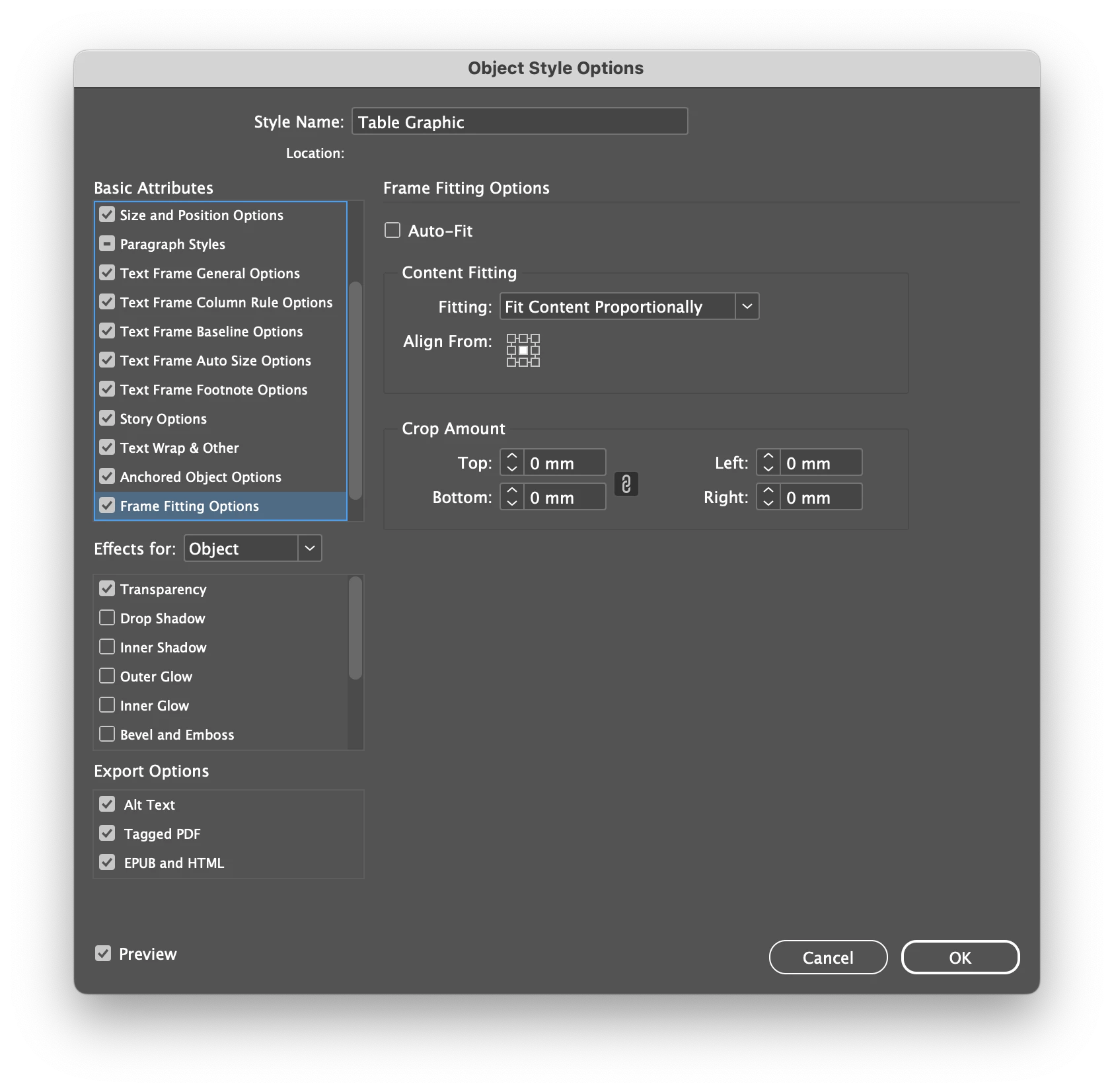
You will see that the script uses the exact suggestion that @Laubender made. Let me know how it goes.

- Mark


/**
 * @file Apply Object Style to Table Graphics.js
 * 
 * Applies the specified object style to all graphics of selected table(s).
 * 
 * @author m1b
 * @discussion https://community.adobe.com/t5/indesign-discussions/reference-an-anchored-frame-in-a-table-cell/m-p/14562435
 */
function main() {

    // you must edit this to match your object style
    var objectStyleName = 'Table Graphic';

    var doc = app.activeDocument,
        items = doc.selection;

    if (0 === items.length)
        return alert('Please select some page items and try again.');

    var objectStyle = doc.objectStyles.itemByName(objectStyleName);

    if (!objectStyle.isValid)
        return alert('Could not find "' + objectStyleName + '" object style.');

    for (var i = items.length - 1, item; i >= 0; i--) {

        if (
            items[i].parent.hasOwnProperty('tables')
            && items[i].parent.tables.length > 0
        )
            items[i] = items[i].parent;

        else if (0 === items[i].tables.length)
            continue;

        // apply the object style to each graphic of each table of each item
        for (var j = 0; j < items[i].tables.length; j++)
            for (var k = items[i].tables[j].allGraphics.length - 1; k >= 0; k--)
                items[i].tables[j].allGraphics[k].parent.appliedObjectStyle = objectStyle;

    }

};
app.doScript(main, ScriptLanguage.JAVASCRIPT, undefined, UndoModes.ENTIRE_SCRIPT, 'Apply Object Style to Table Graphics');


 

gnuklearAuthor
Participant
April 19, 2024

@m1b Thanks for this. It saved me a lot of time.

Community Expert
April 18, 2024

Hi @gnuklear ,

with ExtendScript you get all graphics (also images) of a table with:


table.allGraphics


This is an array.

To get to the container frames of the graphics in the array loop the array and ask for the parent of every entry.


DOM reference compiled by Gregor Fellenz:

https://www.indesignjs.de/extendscriptAPI/indesign-latest/#Table.html


Regards,
Uwe Laubender
( Adobe Community Expert )

gnuklearAuthor
Participant
April 19, 2024

@Laubender  Thanks for the solution, used @m1b script to fix my table issues.
