The problem is this:
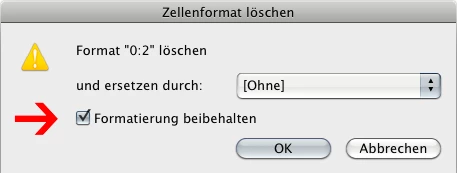
I want to convert the formatting from one cell to another (in a different table). After this, the formatting of the new cell should be retained, but the cell Style is to be deleted.
So I remove the generated cell style and replace it with cellStyle:[None] but there is also no option to reserve formatting via script. 
For ChararacterStyle it’s the same: there is no option like in the GUI
void remove([replacingWith: CharacterStyle])
Now I try to work with the properties of the cell.
Kind regards
Roland
Roland:
You could iterate through all your cells with the applied cell style, select the cells one after another and apply a menu action to break the link to the style ("Break Link to Style" / "Verknüpfung mit Format aufheben").
Then you can remove the cell style without loosing any formatting.
To invoke the menu action you could use this code. For security reasons I wrapped it up with a "try/catch":
//Disconnect the cell with the applied cell style (option in the cell styles panel of the UI: "Break Link to Style" / "Verknüpfung mit Format aufheben"):
try{app.scriptMenuActions.itemByID(132129).invoke()}catch(e){};
Uwe
 AdChoices