Answered
Remove Curved Corners {Renamed}
I created a shape with my rectangle tool that has 2 curved corners and 2 regular corners. Now it only draws that shape. How can I reset it to draw regular rectangles?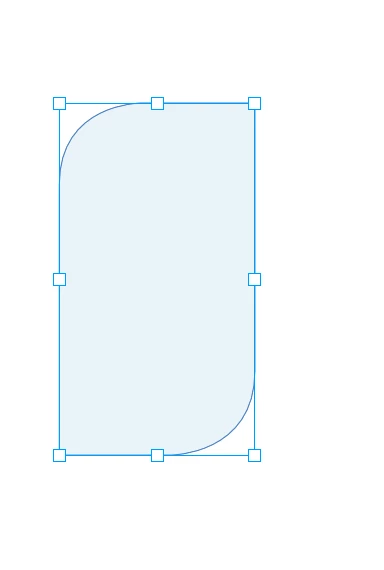
I created a shape with my rectangle tool that has 2 curved corners and 2 regular corners. Now it only draws that shape. How can I reset it to draw regular rectangles?
Hi cmatulich27 ,
somehow you did a new default for creating graphic frames.
Either for your document that is open or all documents you'll like to add at a later time.
To change this:
1. Do not close the document where you see this.
2. Unselect everything.
3. Go to menu Object > Corner Options…
4. Choose 12 Pt with "No Corner Options" in the upper left field, the rectangular widget is now showing.
5. Close the chain between the input fields to apply this values to all fields.
Save and close the document.
Do step 1 to 5 when no document is open.
Regards,
Uwe
Already have an account? Login
Enter your E-mail address. We'll send you an e-mail with instructions to reset your password.
 AdChoices