lfcorullon13651490
Legend
November 2, 2017
Answered

Remove duplicates

  • November 2, 2017
  • 2 replies
  • 4707 views

Hello there,

I have a story in InDesign that is a list.

This list have hours and information.

I want to remove the duplicate hours, but keep the information together with the previous that has the same hour.

For example, I want to format this:

16 horas - Informação 1

16 horas - Informação 2

16 horas - Informação 3

16h45 - Informação 4

16h50 - Informação 5

17h30 - Informação 6

17h30 - Informação 7

As this:

16 horas - Informação 1

Informação 2

Informação 3

16h45 - Informação 4

16h50 - Informação 5

17h30 - Informação 6

Informação 7

Anyone of you have a great idea to make this using javascript and GREP find/change?

Thanks!

This topic has been closed for replies.
Correct answer Marc Autret

Hi If.corullon,

Just to add my two pennies, there is an interesting way of removing duplicated patterns at the beginning of paragraphs. The word ‘interesting’ does not pretend to mean ‘efficient’ but I think we may learn something from this ;-)

Disregarding the specific \d+ horas and/or \d+h\d+ patterns involved in your example, I will focus on a more generic scheme for my demonstration. Let's just target strings like [^-]+-\s, that is, “anything before a hyphen, then the hyphen, then any space character.” Our goal is to detect and remove such pattern when it is repeated at the beginning of successive paragraphs.

My first idea was to use something like ^([^-]+-\s)[^\r]+\r\K\1 , but this only selects the 2nd instance of the repeated pattern, so that wouldn't work at all for arbitrary number of dups. Now the funny trick is just a slight variation of the previous regex, /^([^-]+-\s)([^\r]+\r\K\1)+/ , which then magically selects the very last duplicate of the \1 capture!

From then we can design a recurring changeGrep() command that never needs to visit the found elements. Simply replace the captures by what you want and loop until changeGrep() returns an empty array. In the code below I use a tab ('\t') as changeTo parameter and my target is app.selection[0] since I have a TextFrame selected (of course you could use any other target, including app):

const GREP = /^([^-]+-\s)([^\r]+\r\K\1)+/;

(function(target)

{

    app.findGrepPreferences = app.changeGrepPreferences = null;


    app.findGrepPreferences.findWhat = GREP.source;

    app.changeGrepPreferences.changeTo = '\t';

    while( target.changeGrep().length );


    app.findGrepPreferences = app.changeGrepPreferences = null;


})(app.selection[0]);

Here is how we can picture the iterative process (all is done in two steps):
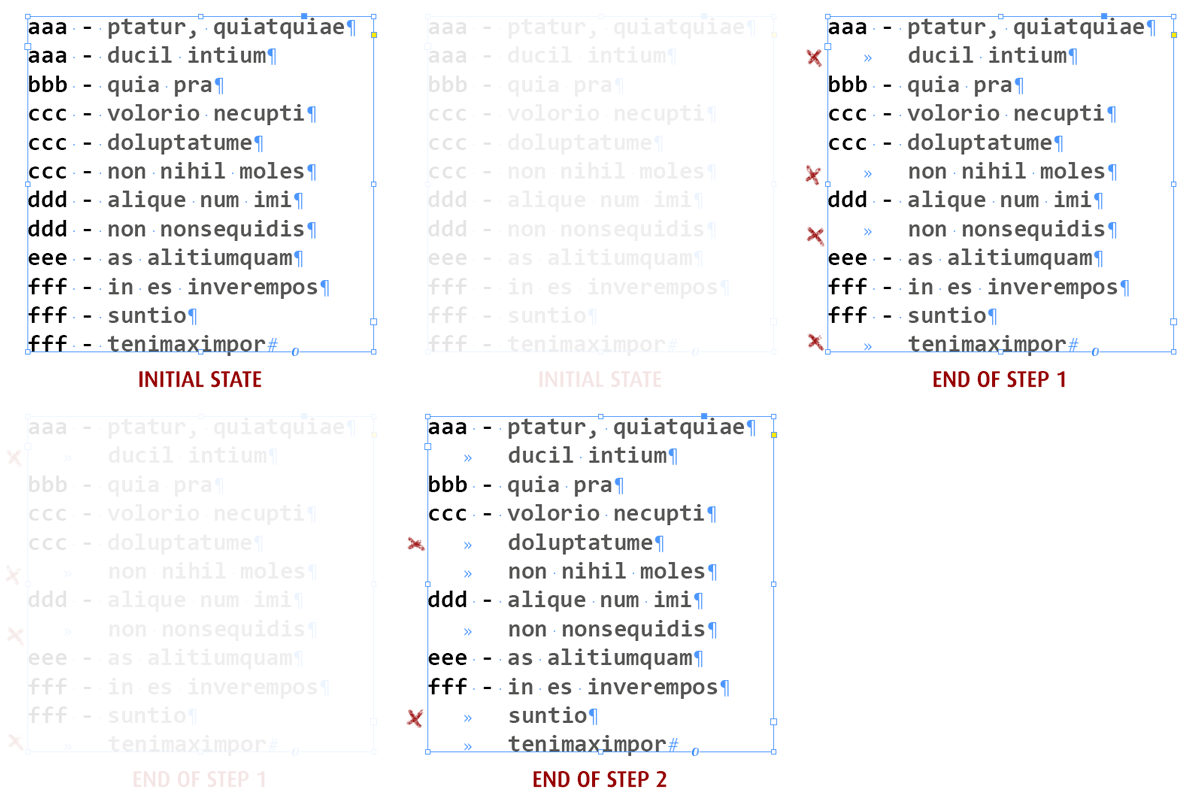
Hope that helps,

@+

Marc

2 replies

Marc Autret
Marc AutretCorrect answer
Legend
November 3, 2017

Hi If.corullon,

Just to add my two pennies, there is an interesting way of removing duplicated patterns at the beginning of paragraphs. The word ‘interesting’ does not pretend to mean ‘efficient’ but I think we may learn something from this ;-)

Disregarding the specific \d+ horas and/or \d+h\d+ patterns involved in your example, I will focus on a more generic scheme for my demonstration. Let's just target strings like [^-]+-\s, that is, “anything before a hyphen, then the hyphen, then any space character.” Our goal is to detect and remove such pattern when it is repeated at the beginning of successive paragraphs.

My first idea was to use something like ^([^-]+-\s)[^\r]+\r\K\1 , but this only selects the 2nd instance of the repeated pattern, so that wouldn't work at all for arbitrary number of dups. Now the funny trick is just a slight variation of the previous regex, /^([^-]+-\s)([^\r]+\r\K\1)+/ , which then magically selects the very last duplicate of the \1 capture!

From then we can design a recurring changeGrep() command that never needs to visit the found elements. Simply replace the captures by what you want and loop until changeGrep() returns an empty array. In the code below I use a tab ('\t') as changeTo parameter and my target is app.selection[0] since I have a TextFrame selected (of course you could use any other target, including app):

const GREP = /^([^-]+-\s)([^\r]+\r\K\1)+/;

(function(target)

{

    app.findGrepPreferences = app.changeGrepPreferences = null;


    app.findGrepPreferences.findWhat = GREP.source;

    app.changeGrepPreferences.changeTo = '\t';

    while( target.changeGrep().length );


    app.findGrepPreferences = app.changeGrepPreferences = null;


})(app.selection[0]);

Here is how we can picture the iterative process (all is done in two steps):

Hope that helps,

@+

Marc

lfcorullon13651490
Legend
November 3, 2017

Absolutely awesome, Marc!

Thank you so much.

Of course it's a much more clever way to deal with it.

Thanks for share!

PS: the use of "const" instead of "var" is to avoid the reassignement of that value?

Marc Autret
Legend
November 3, 2017
PS: the use of "const" instead of "var" is to avoid the reassignement of that value?

In some way, but actually there is no critical reason to use const in that context—in fact I often use the const keyword as a semantic marker. (It is useful in larger projects though, where debug mode and/or persistent engines are involved.)

@+

Marc

Inspiring
November 3, 2017

Didn't have much time to do much.

It only works properly for this scenario:

16 horas - Informação 1

16 horas - Informação 2

16 horas - Informação 3

Maybe someone else can improve it for you

var story = (app.selection[0] instanceof TextFrame && app.selection[0] ) || exit();

var grep = "\\S+(\\s\\S+)?\\s-\\s\\S+\\s\\d";

app.findGrepPreferences = app.changeGrepPreferences = null;

app.findGrepPreferences.findWhat = grep;

var found = story.findGrep();
var first = [];
var duplicate;
var duplicates = [];

    for ( var i = 0; i < found.length; i++ ) {
       
        +found.contents.slice (-1) === 1 && first.push ( found );
        +found.contents.slice (-1) !== 1 && duplicates.push ( found );
    }

    if ( first.length !== 0 ) {

        while ( duplicate = first.pop() ) {

            for ( var i = 0; i < duplicates.length; i++ ) {

                        duplicate.contents.substr (0, 11) == duplicates.contents.substr (0, 11) && duplicates.contents = duplicates.contents.substr (11, duplicates.contents.length);

            }
        }         
    }

lfcorullon13651490
Legend
November 3, 2017

I spent some hours trying to deal with it yesterday.

The way I did it work is:

app.findGrepPreferences = app.changeGrepPreferences = app.findTextPreferences = app.changeTextPreferences = NothingEnum.nothing;

app.findGrepPreferences.findWhat = "(?i)(^\\d+(\\shoras|h)(\\d+)*\\r).+?\\r";

var found = mySel.findGrep();

app.findGrepPreferences = app.changeGrepPreferences = app.findTextPreferences = app.changeTextPreferences = NothingEnum.nothing;

for (var i=found.length-1; i>0; i--) {

     if (found.contents == found[i-1].contents) {

          found.contents = "";

     }

}

app.findGrepPreferences = app.changeGrepPreferences = app.findTextPreferences = app.changeTextPreferences = NothingEnum.nothing;

Thank you so much!

Obi-wan Kenobi
Legend
November 3, 2017

Hi,

Maybe time for you to learn Grep! Take a look at this group: https://www.facebook.com/groups/TreasuresofGrep/

app.findGrepPreferences = null; 

app.findGrepPreferences.findWhat = "^\\d+(\\hhoras|(h\\d+))\\h-\\h"; 

var myFound = app.activeDocument.findGrep(),

F = myFound.length,  f;

for ( f = F-1; f > 0; f--) if ( myFound.contents == myFound[f-1].contents )  myFound.contents = "";

app.findGrepPreferences = null; 

(^/)