Inspiring
October 19, 2024
解決済み

Remove empty space

  • October 19, 2024
  • 返信数 2.
  • 1362 ビュー

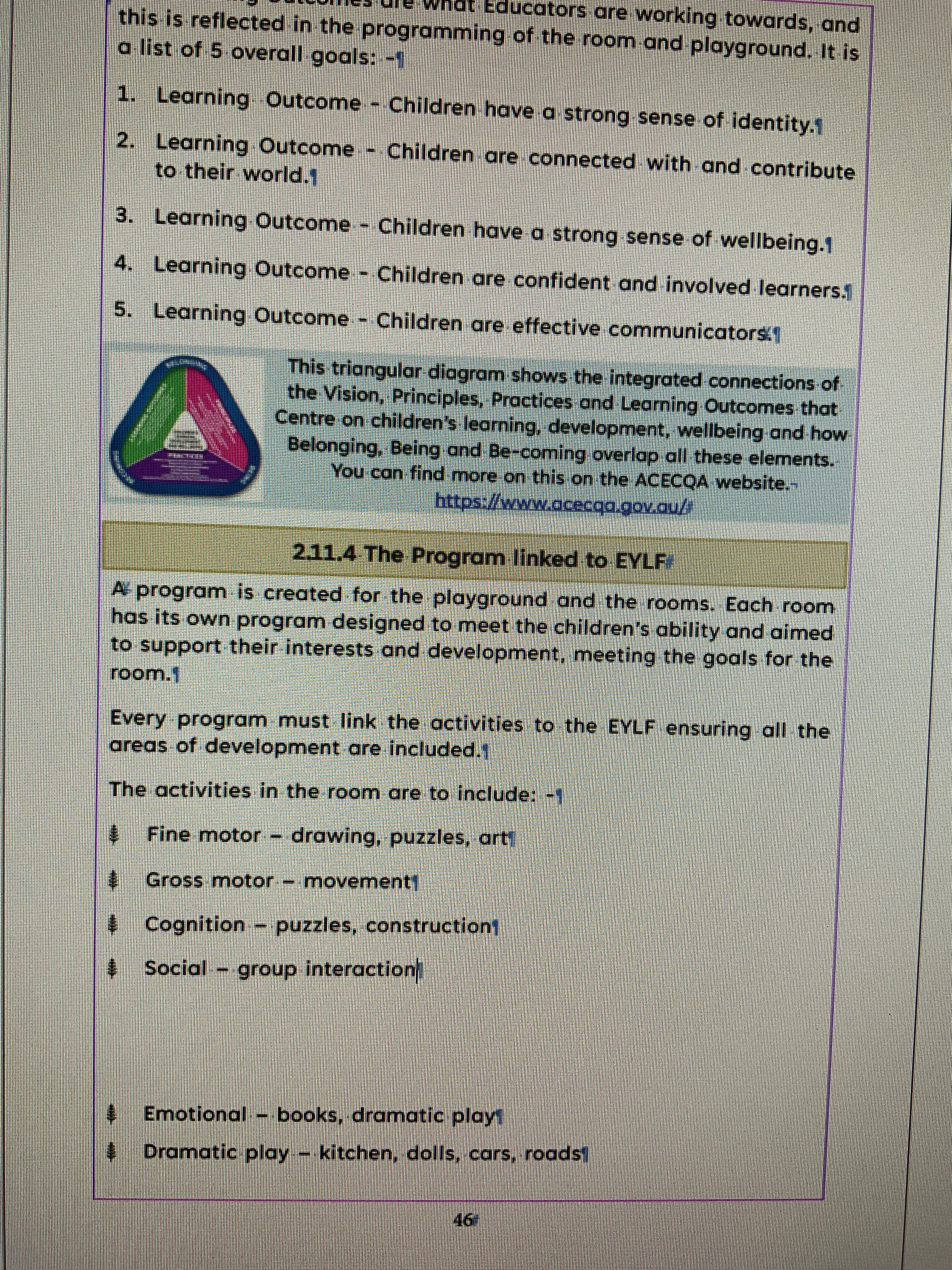
As shown in the above image I have an empty space between "Social - group interaction" and "Emotional - books, dramatic play". I am unable to select it. I have activated show hidden characters and I still cannot see or select the object (if there is one at all). When I backspace the emotional dot point it simply jumps over the blank space to the end of the previous line of text.


I am wanting to remove this empty space so the dot points flow from one to the next with equal spacing.


Kind Regards,


Dave.

このトピックへの返信は締め切られました。
解決に役立った回答 defaulti7odungsw2gy

I have found the issue. Text frame options --> aligh was set to center instead of top. Easily fixed.

返信数 2

Barb Binder
Community Expert
Community Expert
October 20, 2024

I'd say select both paragraphs (Social and emotional), including the pilcrows ¶ at the end of each line (as per @Robert at ID-Tasker) and then set space Before, After and Space Between Paragraphs Using the Same style to 0. Anyone of them could be the issue.


~Barb


~Barb at Rocky Mountain Training
Inspiring
October 21, 2024

I have finally fixed the problem by deleting the page spread then adding a new blank spread to fix the associated oversized text issue.


Thank you all for your assistance.


Dave.

Peter Spier
Community Expert
Community Expert
October 21, 2024

At this point my guess is there was some hidden object on the page there with text wrap applied.

Peter Spier
Community Expert
Community Expert
October 19, 2024

Check for an applied "space before" value applied to the Emotional paragraph.

Inspiring
October 20, 2024


Unfortunately that does not seem to solve the issue.

Robert at ID-Tasker
Legend
October 20, 2024

@defaulti7odungsw2gy 


Which one you are checking - Social or Emotional?


And select whole Paragraphs - including end of paragraph.