
Participant
March 17, 2025
Answered

Remove Hyperlink from text using right-click menu?

  • March 17, 2025
  • 4 replies
  • 1200 views

Feature request:

It would be really useful to be able to remove a hyperlink from text by simply right clicking the text and selecting Hyperlink/Remove hyperlink.


For example, I can do it in this editor right here, by hovering over text containing a link and clicking "unlink". Easy as anything.

To do this in indesign, I need to KNOW to go to the interactive elements menu, find the specific instance of the hyperlink in this menu (which could contain hundereds of links), remove the specific instance of this hyperlink from that menu, just hoping I've selected the correct one and not deleted a key link from miles away in the document...


It's a bizzaire system. If I can add a hyperlink using a right click, and edit a hyperlink using a right click, surely I should be able to remove one too? 


NB: I know how to remove hyperlinks, this is a UI request for a more conventional way of doing so. Feel free to explain why this doesn't exist, but don't tell me it is easier the way it is. It is not.
Correct answer Eugene Tyson

Hello


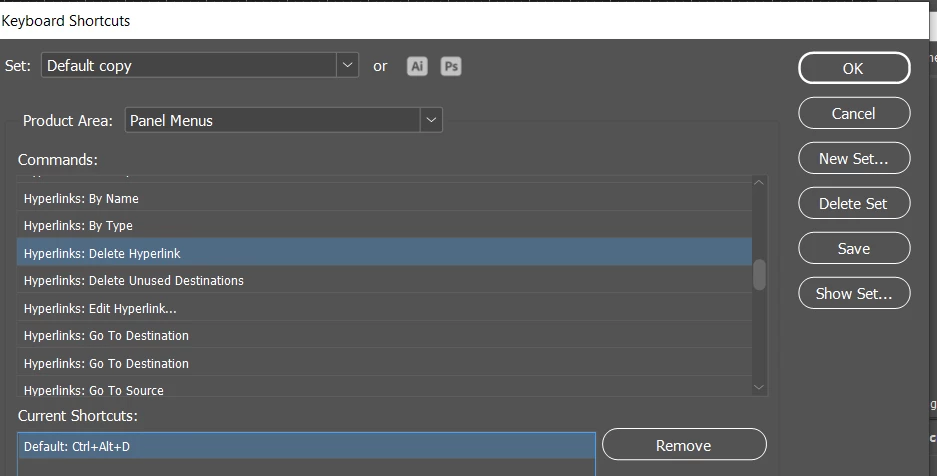
You can assign a shortcut to it - but it doesn't remove the style which has to be handled manually


Could potentially be scriptable to add a context menu to delete the hyperlink - I think I've seen things added via scripting before.


Can definitely delete the hyperlink with a script, but that doesn't add an option in the right click context menu... you could add a shortcut, but that just does the same - it could remove the style Hyperlink too though. 


How do you want this to go? 


Is adding KBSC enough for your needs or do you need to remove the hyperlink style too? 

4 replies

Robert at ID-Tasker
Legend
March 17, 2025

@Ocelot33957008qfll


Do you have a lot of those Hyperlinks to remove?


Robert at ID-Tasker
Legend
March 17, 2025

@Ocelot33957008qfll


This should be a good start for adding to the Context menu:


https://www.marspremedia.com/software/indesign/add-save-to-context-menus


Eugene TysonCommunity ExpertCorrect answer
Community Expert
March 17, 2025

Hello


You can assign a shortcut to it - but it doesn't remove the style which has to be handled manually


Could potentially be scriptable to add a context menu to delete the hyperlink - I think I've seen things added via scripting before.


Can definitely delete the hyperlink with a script, but that doesn't add an option in the right click context menu... you could add a shortcut, but that just does the same - it could remove the style Hyperlink too though. 


How do you want this to go? 


Is adding KBSC enough for your needs or do you need to remove the hyperlink style too? 

Participant
March 17, 2025

Thanks Eugene,

The shortcut will be useful enough for now. In most of my documents the URLs are not formatted differently, as we are print focused (unusual for 2025 I know). Digital readers get an underlined link, but not hard to remove that. I'll do as Abhishek says and add this to uservoice instead, where I see it is already requested!

Thanks!

Abhishek Rao
Community Manager
Community Manager
March 17, 2025

Hi @Ocelot33957008qfll,


Thanks for sharing your feedback! While this isn’t available yet, I’d suggest submitting a request on UserVoice, so others can upvote it.

Once you create it, feel free to share the link here so others can support it too.

For now, the quickest way to remove a hyperlink is by selecting the text, going to Window > Interactive > Hyperlinks, and clicking the trash icon at the bottom of the panel. Moreover, when you select a Hyperlink and look in the Properties panel, you will see 3 buttons – ‘Remove Hyperlink’, ‘Edit Hyperlink’ and ‘Manage Hyperlink’ as well. 

Let me know if you have any other questions!


^

Abhishek