MDY Marketing
Participant
December 21, 2022
Answered

Remove the Letter V layout in Pages panel

  • December 21, 2022
  • 5 replies
  • 1536 views

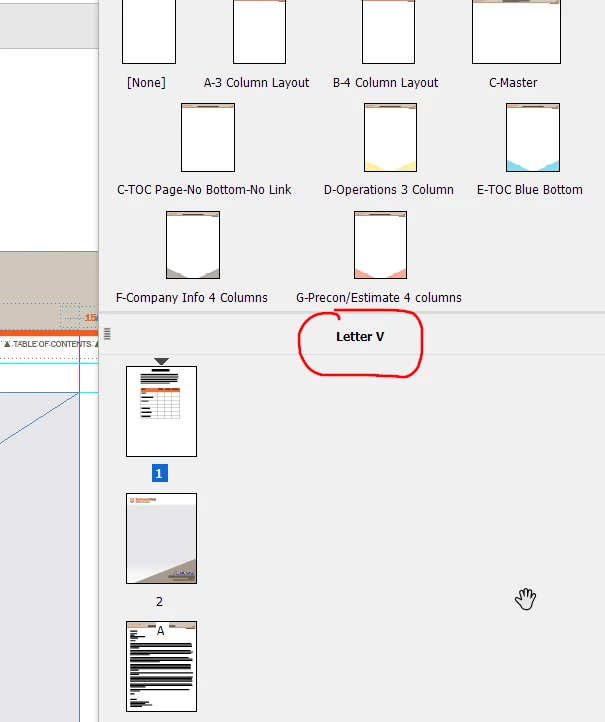
Recently my Pages panel has an indication of a Letter V layout. What does this mean? I don't know how/why it is there. There is no Alternate Layout indicated. 


This topic has been closed for replies.
Correct answer Laubender

"Most of the pages are vertical but there's one thats horizontal. "


That does not matter much. The name of the layout was done when you did this new document that started out as a Letter page layout in "portrait" mode and not "landscape". If you later change the size of a single page with the Page tool it has no influence on the name of the layout. Even if you'd do that to all pages in the document…


Regards,
Uwe Laubender
( Adobe Community Expert )

5 replies

LaubenderCommunity ExpertCorrect answer
Community Expert
December 22, 2022

"Most of the pages are vertical but there's one thats horizontal. "


That does not matter much. The name of the layout was done when you did this new document that started out as a Letter page layout in "portrait" mode and not "landscape". If you later change the size of a single page with the Page tool it has no influence on the name of the layout. Even if you'd do that to all pages in the document…


Regards,
Uwe Laubender
( Adobe Community Expert )

Mike Witherell
Community Expert
Community Expert
December 22, 2022

If you want to go on a curious trip, ask the Pages panel menu button to build you a default Alternate Layout. It makes two sets of your paragraph styles! V and H! Then try Links panel menu button, Link Options, Define Custom Style Mapping, Settings, New Style Mapping. The two sets of styles can be related to each other; yet be different looks and attributes. Let my head spin!

Mike Witherell
MDY Marketing
Participant
December 22, 2022

my head is already spinning 🙂 !

Barb Binder
Community Expert
Community Expert
December 22, 2022

😂. @Mike Witherell  has been making me laugh out loud for 25 years. And his comment today was no exception. 


It's just a View setting in the Pages panel. My US English version does not default to showing V as per Uwe's reply, but even if you are not using Alternative Layouts, it's still an option to enable that view. Because I work primarily online documents, I prefer to set my view to horizontal so that I can get more spreads on my screen at one time. It's just a preference.


~Barb

~Barb at Rocky Mountain Training
Community Expert
December 22, 2022

Hi @MDY Marketing ,

actually "Letter V", the "V" stands for "vertical", is an Alternate Layout.

Even if the document contains only one single layout, the one with the name "Letter V".

It's just a view on the document's layout structure from a different perspective. The name is automatically set by InDesign when you do a new document. Nothing to care about here…


Regards,
Uwe Laubender
( Adobe Community Expert )

Barb Binder
Community Expert
Community Expert
December 21, 2022

Window > Pages > Pages panel menu > View Pages > Vertically (or Horizontally).


~Barb

~Barb at Rocky Mountain Training
Randy Hagan
Community Expert
Community Expert
December 21, 2022

Is it a letter-sized page? It's certainly set up as a vertical layout ...


Randy

MDY Marketing
Participant
December 22, 2022

Most of the pages are vertical but there's one thats horizontal. 

Barb Binder
Community Expert
Community Expert
December 22, 2022

Can you share a screen shot?


~Barb

~Barb at Rocky Mountain Training
