
Participant
January 18, 2024
Answered

Removing Spaces From InDesign JPEG Export Suffix Modifier

  • January 18, 2024
  • 2 replies
  • 460 views

Greetings!

Is there a way to for the suffix filename modifier in InDesign to export a filename without adding spaces?
It currently exports like "TestInDesignDoc_1080 x 1080" and I would like it to export like "TestInDesignDoc_1080x1080".
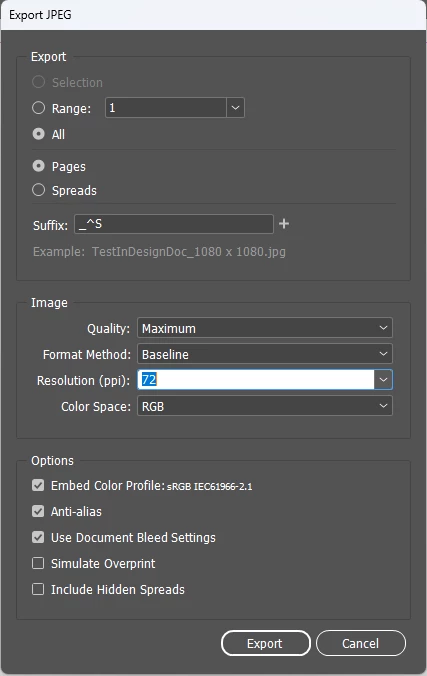

I have a team that exports a large amount of multisized JPEGs and it would just be a quality of life change for my design team to my web team.


If not, we can just remove spaces but just thought I'd reachout if anyone knew!

Thanks so much!


This topic has been closed for replies.
Correct answer Eugene Tyson

The only thing I can think of is a Batch Rename.


You could export all the pages to your folder to give the filename with _^S


Then place all the images into a blank InDesign File

I came across this before which works great

https://www.marspremedia.com/software/indesign/links-grep-rename#:~:text=Use%20GREP%20(regular%20expressions)%20to,renamed%2C%20see%20Links%20GREP%20Relink.


It allows you to rename all the links in a document. 

Basically - you'll replace a 'space x space' with 'x'


And it should rename all the files in the folder. 


Close the sample document and save or don't save the file.


I'm sure you could batch rename through Bridge maybe too. 


I'm not sure if the entire sequence could be scripted

Export all pages to JPEG 

Place all images into temp indesign file

Batch Rename the folder to remove spaces between ' x ' 


2 replies

Participating Frequently
January 23, 2024

I've wondering the exact samething, have you been able to find any solutions to this?

Eugene TysonCommunity ExpertCorrect answer
Community Expert
January 24, 2024

The only thing I can think of is a Batch Rename.


You could export all the pages to your folder to give the filename with _^S


Then place all the images into a blank InDesign File

I came across this before which works great

https://www.marspremedia.com/software/indesign/links-grep-rename#:~:text=Use%20GREP%20(regular%20expressions)%20to,renamed%2C%20see%20Links%20GREP%20Relink.


It allows you to rename all the links in a document. 

Basically - you'll replace a 'space x space' with 'x'


And it should rename all the files in the folder. 


Close the sample document and save or don't save the file.


I'm sure you could batch rename through Bridge maybe too. 


I'm not sure if the entire sequence could be scripted

Export all pages to JPEG 

Place all images into temp indesign file

Batch Rename the folder to remove spaces between ' x ' 


Joel Cherney
Community Expert
Community Expert
January 18, 2024

That's a new feature, and if there's a way to change it, it's not documented. 


I'd say it would be worth a feature request over at indesign.uservoice.com. If you do post a feature request there, please do come back here and let us know, so people who find your post and say to themselves "Well, yeah, I would like more robust options in the filename suffix field when exporting rasters directly from ID" - like me, for example! - can upvote your  feature suggestion and increase the likelihood that the developers will see it.