Known Participant
October 18, 2011
Answered

removing swatch colour from character style

  • October 18, 2011
  • 1 reply
  • 1048 views

Hi,

I'm doing a find/change via script to remove the fill colour from a character style.

So far I've got it to replace the current colour with None, using this:

   app.changeGrepPreferences.fillColor = myDocument.colors.item("None");

But what I really need is to replace it with the question mark symbol, like below, so it can inherit another colour I've applied via a grep style.
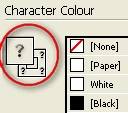
Doing this manually in Indesign I would Control+click the swatch.

I've spent the last couple of days looking for the magic bit of code I'm missing with no luck, hopefully you guys can help.

Cheers,

John

This topic has been closed for replies.
Correct answer tomaxxi

Hey John,

Try this one:

app.changeGrepPreferences.fillColor = NothingEnum.NOTHING;

Hope that helps.

--

Marijan (tomaxxi)

http://tomaxxi.com

1 reply

tomaxxi
tomaxxiCorrect answer
Inspiring
October 18, 2011

Hey John,

Try this one:

app.changeGrepPreferences.fillColor = NothingEnum.NOTHING;

Hope that helps.

--

Marijan (tomaxxi)

http://tomaxxi.com

jonhtAuthor
Known Participant
October 18, 2011

Hi Marijan,

That did the trick!

Thanks for your help.

Cheers,

John

tomaxxi
Inspiring
October 18, 2011

No problem,

you are welcome!

For more info take a look here:

http://jongware.mit.edu/idcsjs5.5/pe_NothingEnum.html

--

Marijan