
Velprakash
Inspiring
June 26, 2012
Answered

Rename particular XML Tag

  • June 26, 2012
  • 2 replies
  • 2490 views

Hi Indesign Experts,

          I'm confused a lot in the below issue. I'm have a indesign document. In the xml structure, If i select a element, and trying to rename the selected item's markupTag.name, it's changing all the elements with the selected elements name....
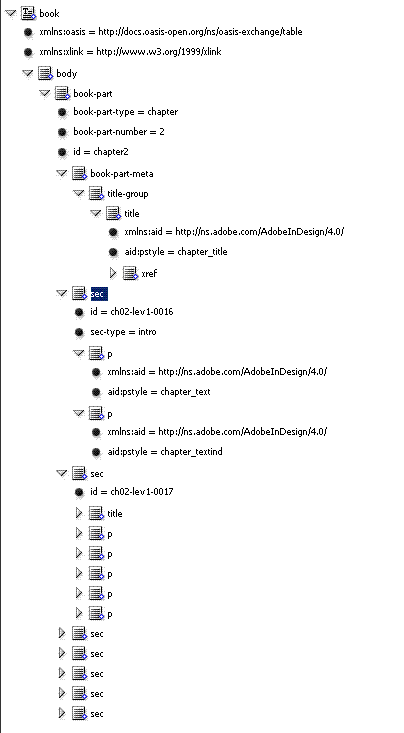
I use the below code to run after selecting an xml Element.

app.selection[0].markupTag.name="test";

But the output look like the below.
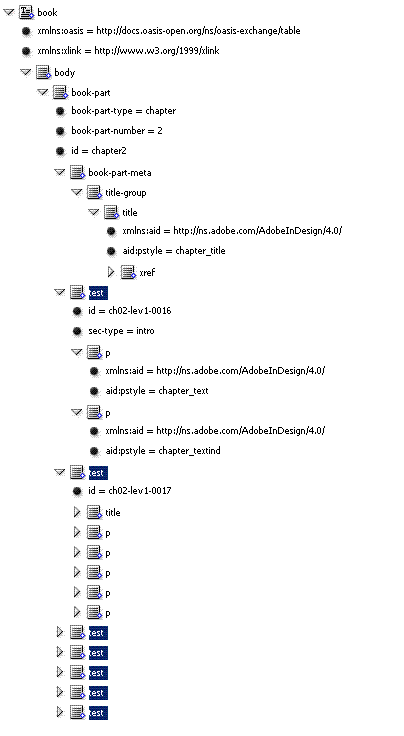
But I want onlu to rename the selected xmlelement.

Any idea to perform this?

Thanks and Regards,

Vel.


This topic has been closed for replies.
Correct answer absqua

You're changing the name of the applied tag rather than assigning a different tag. Try this:

var testTag = app.activeDocument.xmlTags.item("test").isValid ? app.activeDocument.xmlTags.item("test") : app.activeDocument.xmlTags.add({name: "test"});

app.selection[0].markupTag = testTag;

Jeff

2 replies

Legend
June 26, 2012

Jeff is right.

There is a quick and dirty way to create the tag on the fly: the "markupTag" property also accepts strings.

app.selection[0].markupTag = "test";

Dirk

Inspiring
June 27, 2012

Thanks Dirk. That's better. For some reason I always use the more explicit object assignment in these kinds of situations. Do you know of other instances where a string assignment like that will result in a non-existant object being created on the fly? Are there any rules governing this that you can make out?

Legend
June 27, 2012

The internal description of properties allows for alternative types. Most of the time the primary type would be the result for the getter access, while the alternative types are the accepted values for setters. I haven't searched for them in detail, but styles come to mind that are adressable by name, without creating them.

In the ObjectModel Viewer xml file these types are automatically lumped together in the comment.

Dirk

absquaCorrect answer
Inspiring
June 26, 2012

You're changing the name of the applied tag rather than assigning a different tag. Try this:

var testTag = app.activeDocument.xmlTags.item("test").isValid ? app.activeDocument.xmlTags.item("test") : app.activeDocument.xmlTags.add({name: "test"});

app.selection[0].markupTag = testTag;

Jeff