
Chris Purser
Known Participant
January 5, 2019
Answered

Renaming pages

  • January 5, 2019
  • 9 replies
  • 33588 views

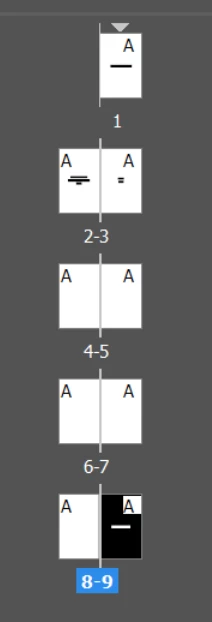
Hi, I'd like to rename pages so that in the thumbnail view, I have some idea what they contain, so I can reorder.

Like in almost every other CC product, (PS, AE, Pr, etc.) thumbnails have names so that if you want to reorder them, dragging and dropping is simple by using the thumbnails and their names.

I can find no way to do this in In-Design and I've searched forums, etc. and only find people asking for it but no one providing the answer.

Hard to imagine it's not possible, that the only thing my pages get named as is their number (order)... which changes...

You can see it's not possible to tell from the thumbnails what is on these pages (yes some are blank).

I'm a noob and I'm sure I'm just missing something basic...

Thanks
[Here is the list of all Adobe forums... https://forums.adobe.com/welcome]

[Moved from generic Cloud/Setup forum to the specific Program forum... Mod]

Correct answer Dave Creamer of IDEAS

Be sure to post your request at:

https://indesign.uservoice.com/

That's what Adobe looks at.

(Search first to see if the feature is already requested.)

9 replies

tgm2465
New Participant
November 12, 2023

This is late, but I was just looking it up for myself. I wanted to name each page by it's individual heading so that I can find/rearrange them easier in the Page panel.


Closest thing I found was Pages > Right-click the page thumbnail > Numbering & Section Options. You can put 8 letters in "Section Prefix". It still makes you put a number, but I just set them all to "Start Page Numbering at: 1" .


I know it's not clean designing, but it helped. 

New Participant
December 5, 2023

This is exactly what I was going to suggest. I create flyers for various Sales people and I create the flyer as a master page, then additional pages per each sales person that way they can have their own contact info on their version of the flyer. I just edit the section prefix to their name, then I can export each page indivially as PDF to send to each person. 

stephanieleighgraphics
New Participant
June 14, 2022

I really wish I could name pages in InDesign - I don't care who doesn't know anyone else who would want to do that - for my purposes, I do. 

I'm not an editor, I don't work with magazines, I'm a graphic designer in the film industry and I use Adobe to create ficitional work for graphic props. Why I want to do it is my own business, my own workflow.

Dave Creamer of IDEAS
Dave Creamer of IDEASCorrect answer
Community Expert
June 17, 2022

Be sure to post your request at:

https://indesign.uservoice.com/

That's what Adobe looks at.

(Search first to see if the feature is already requested.)

David Creamer: Community Expert (ACI and ACE 1995-2023)
stephanieleighgraphics
New Participant
June 19, 2022

Incredible, advice I can use! Thanks so much!

casinclaire
Inspiring
July 20, 2020

I haven't read this whole thread, but I'm wondering if anyone suggested using the Book feature (found under "File>New") in InDesign to separate out your sections?  You could have one book (a collection of files, or even just one file) each for the front/middle/back -- which, I would imagine would capture ads in the front, cast, etc., in the middle, and more ads at the back. Then combine at the end in a Library (also found under File>New). At least you'd have your sections separated for a little bit easier organizing while you work. And once your "book" files are compiled in a library file, you could set the page numbering for continuous (from one book to the next) and print your PDF.

Brave_shape16B8
New Participant
February 15, 2020

You can rename. Right click on the name of the page/spead in the Pages panel and choose Master options for "original name"

New Participant
January 14, 2020

I get around this by creating a top layer in InDesign which I call "Notes" and I put a text box on each page that provides a name for the page. You can always turn off the top layer whenever you need to work on a page, and turn it back on when you need to find pages in your layout.


Community Expert
October 24, 2019

Hi DigitalDesigner1,

just out of curiosity, can you name some apps that doing page naming to your liking?

How can the names be addressed? How can they be managed?


Thanks,
Uwe Laubender

( ACP )

Inspiring
September 3, 2021

Hi Laubender,

I came here looking for a way to name pages.  I'm making blog covers that all have a similar layout.  I would like to name them so that I can export them and put them with the correct blog post easily.  I can do this online with Canva.  Canva allows you to name pages and works much like InDesign for this type of project.  I would, however, have to upload all my images to Canva first.  Since I pay more for InDesign than Canva, I was hoping that this would be a feature in In Design.  


Respectfully,

Stacey

Known Participant
October 24, 2019

I've landed here looking for an answer to this, and have to say I agree with Chris, this is yet another essential feature missing which many other lesser tools already have. The option should be there for users who want to use it, for those that don't they can keep doing things the way they have been.

Community Expert
January 5, 2019

Hi Chris,

with InDesign you can "name" pages. At least a bit.

But you are very restricted in the number of characters and you have to think in units of page sections.

There is prefix naming with a maximum of eight characters that can be shown in the Pages Panel.

However, if you need a different prefix per page you also need a different section per page.

From my German InDesign where I changed the numbering and section options by adding a prefix:

Another way would be to use a page label color:

Yet another way would be using a so-called script label.

But you cannot apply or see this label without selecting a page with the Page Tool in the Layout window and using the Script Label Panel:

That all aside you could use a text frame on the page with a huge point size doing a descriptive text of the page or a name, setting this frame on a layer stacked above all other layers and showing a thumbnail view of the page contents in the Pages panel. You may lock this layer. Do not set it to non-printing, because you would not see its contents in the Pages panel:

Regards,
Uwe

Dave Creamer of IDEAS
Community Expert
January 5, 2019

You could apply custom master pages to each unique set of pages. You could name the master with up to four letters rather than "A" for every one. This would only be efficient if you are using a particular master page more than once.

if each page is unique, you could also section each page with a prefix code, which would have to be done one at a time and manually. You could use this for consecutive sections of pages too.

I suppose you could use alternative layouts for each page, but leaving the page size as is. You can use the layout name as the "page" name.

David Creamer: Community Expert (ACI and ACE 1995-2023)
Chris Purser
Known Participant
January 5, 2019

Wow, shocking.

I'm so surprised and disappointed.

This is such a basic thing and that you have to trick the program into doing something it should already do is bewildering.

Ok thanks for the work around.

I appreciate the band aid.