Susan Flamingo
Known Participant
December 9, 2020
Answered

repeating find and replace

  • December 9, 2020
  • 1 reply
  • 346 views

Sorry for being a dummy, as this is probably easy to figure out, but I am a newbie to ID:


I have to run the same find and replace sequence on multiple files:

1. Find A and replace with AB

2. Find F and replace with FG

3. Find R and replace with TY

etc etc.

Is there a way and can save all these commands together so on the next file I can just run "something" and it is all done.....

Plz go easy on me and make it really simple.....

Thank You so much

Susan
This topic has been closed for replies.
Correct answer jmlevy

In the find-change window you can save your favorite requests:

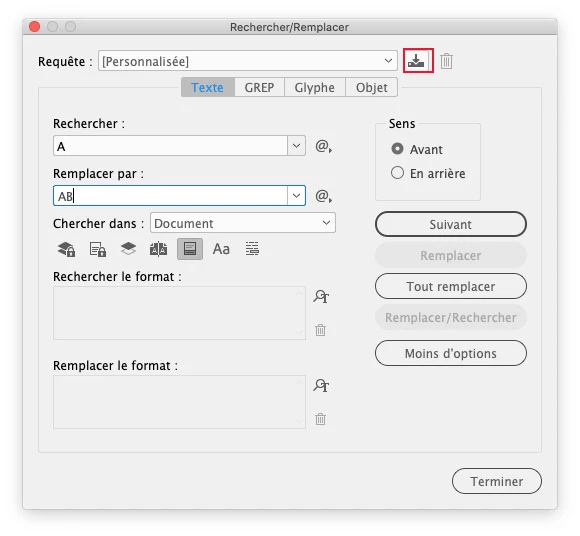
Click on the icon near to the trash


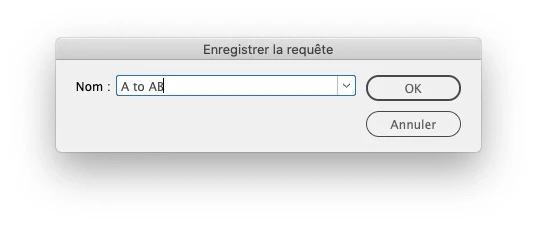
Save your request

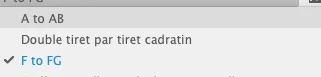
then you'll find them in the dropdown menu:

Note that if you want to run this with one command, you can use the “multifind change” plugin:

http://www.automatication.com/index.php?id=12

1 reply

jmlevy
Community Expert
jmlevyCommunity ExpertCorrect answer
Community Expert
December 9, 2020

In the find-change window you can save your favorite requests:

Click on the icon near to the trash


Save your request

then you'll find them in the dropdown menu:

Note that if you want to run this with one command, you can use the “multifind change” plugin:

http://www.automatication.com/index.php?id=12