

Answered
Resize All items Size with Selecting Anchor Point Option
Hi Experts,,
I made simple script to resize page items and i tried to make variable for Anchor point option in this script
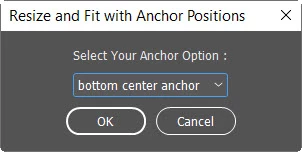
but it not work and give me this error (predicate expression) ..etc as shown here :
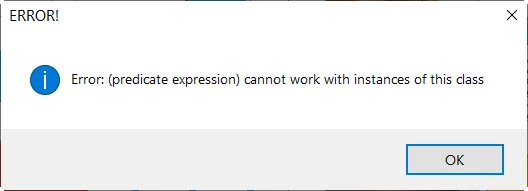
and here is the script that causing this error :
//------------------------------------------
//Resize All items Size with Selecting Anchor Point
//------------------------------------------

// ========
// DIALOG
// ========
var dialog = new Window("dialog");
dialog.text = "Resize and Fit with Anchor Positions";
dialog.preferredSize.width = 300;
dialog.orientation = "column";
dialog.alignChildren = ["center", "center"];
dialog.spacing = 10;
dialog.margins = 16;

//Add DropDown
var myAnchoreTitle = dialog.add ("statictext", undefined, "Select Your Anchor Option :");
var AnchorPointsa = ["bottom center anchor", "bottom left anchor", "bottom right anchor", "center anchor", "left center anchor", "right center anchor", "top center anchor", "top left anchor", "top right anchor"];
var AnchorPointsaList = dialog.add("dropdownlist", undefined, undefined, { name: "AnchorPointsaList", items: AnchorPointsa });
AnchorPointsaList.selection = 0;
AnchorPointsaList.alignment = ["center", "center"];

//Buttons
var buttons = dialog.add ("group")
buttons.add ("button", undefined, "OK");
buttons.add ("button", undefined, "Cancel");

//dialog.show();
var a = dialog.show()
if(a == 2){
  dialog.close();
  exit(0);
}

//Error Catcher for Function
function CatchMyError(){
    try {
        DoAllFrameSize();
    //Catch Error
    } catch (myError) {
    alert (myError,"ERROR!");
    exit();
    }
}

function DoAllFrameSize(){

    var myheight ="5.5 cm";
    var mywidth = "5.5 cm";

    //One Selected Anchor Point
    var SelectedAnchor = AnchorPointsaList.selection.index;
    switch (SelectedAnchor) {
            case 0:
                var myAnchorString = "BOTTOM_CENTER_ANCHOR";
                break;
            case 1:
                var myAnchorString = "BOTTOM_LEFT_ANCHOR";
                break;
            case 2:
                var myAnchorString = "BOTTOM_RIGHT_ANCHOR";
                break;
            case 3:
                var myAnchorString = "CENTER_ANCHOR";
                break;
            case 4:
                var myAnchorString = "LEFT_CENTER_ANCHOR";
                break;
            case 5:
                var myAnchorString = "RIGHT_CENTER_ANCHOR";
                break;
            case 6:
                var myAnchorString = "TOP_CENTER_ANCHOR";
                break;
            case 7:
                var myAnchorString = "TOP_LEFT_ANCHOR";
                break;
            case 8:
                var myAnchorString = "TOP_RIGHT_ANCHOR";
                break;
            default:
                break;
}

var allDocItems = app.activeDocument.pageItems.everyItem();
allDocItems.resize(
    [CoordinateSpaces.INNER_COORDINATES, BoundingBoxLimits.GEOMETRIC_PATH_BOUNDS],
    AnchorPoint.(myAnchorString),
    //AnchorPoint.TOP_CENTER_ANCHOR,
    ResizeMethods.REPLACING_CURRENT_DIMENSIONS_WITH,
    [UnitValue(mywidth).as('pt'), UnitValue(myheight).as('pt')]
    );
}

//Run with UNDO Enabled
app.doScript(CatchMyError, ScriptLanguage.JAVASCRIPT, undefined, UndoModes.ENTIRE_SCRIPT, "Change All items Size with Selected Anchor");

//Anchor Point
//~ AnchorPoint.BOTTOM_CENTER_ANCHOR
//~ AnchorPoint.BOTTOM_LEFT_ANCHOR
//~ AnchorPoint.BOTTOM_RIGHT_ANCHOR
//~ AnchorPoint.CENTER_ANCHOR
//~ AnchorPoint.LEFT_CENTER_ANCHOR
//~ AnchorPoint.RIGHT_CENTER_ANCHOR
//~ AnchorPoint.TOP_CENTER_ANCHOR
//~ AnchorPoint.TOP_LEFT_ANCHOR
//~ AnchorPoint.TOP_RIGHT_ANCHOR
Actually i dont know if this is possible to work, so please advice me what to do? and thanks in advance


 AdChoices