
Resizing image frame turns image grey in InDesign 2019/2018
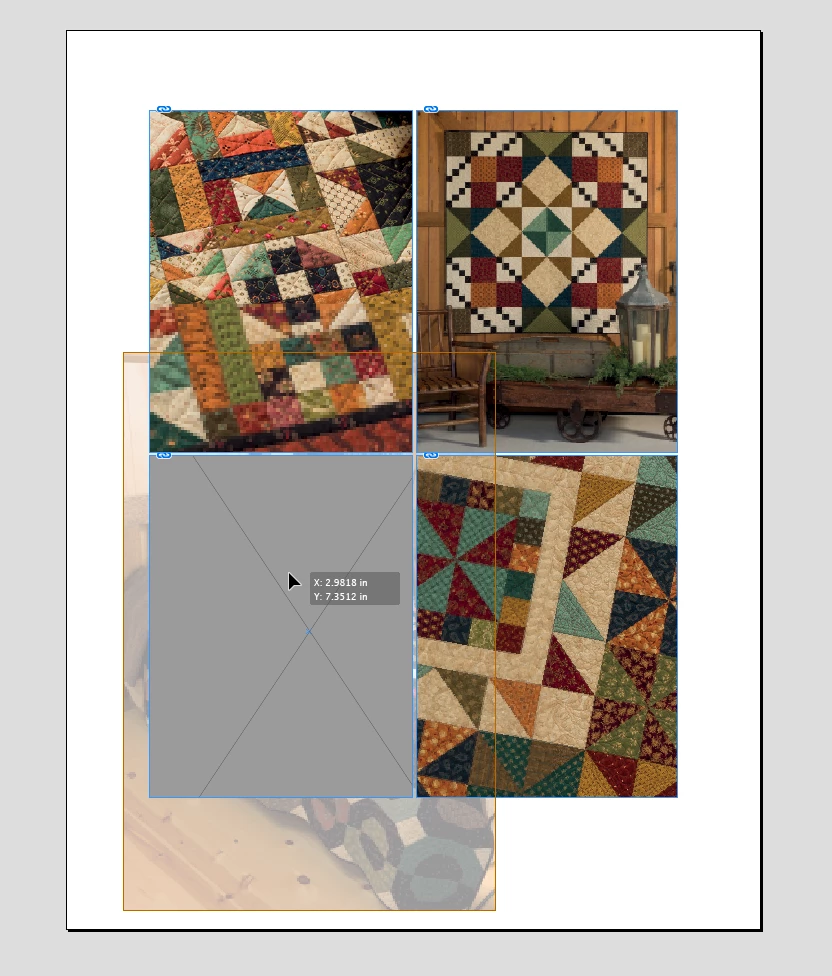
This has been going on for months. When I crop an image by dragging handles, the portion inside the image frame turns grey, while the portion outside the frame appears transparent. This also happens when resizing an image inside a frame, and when using the mouse to just move an image within a frame. This issue is cause for much frustration because I can't see the portion inside the frame when doing any of these actions—just a grey box. And that's not helpful when cropping, sizing and moving.
I read elsewhere in the forum the same question, and the answer was to turn off Content Aware Fit in preferences. I would do this, but I can't find Content Aware Fit in preferences. Also I thought that was introduced in 2019, and I'm using 2018. I did use 2019 for a short period, but had to go back to 2018 to work in the same version as coworkers. This issue happens in all Indesign documents. In fact, I just opened the 2019 version and Content Aware Fit was already off, and the images were still turning grey when cropped, resized, etc.
Pleased help. It's driving me crazy. 
Image below shows grey inside frame, while portion of image outside the frame is transparent.
Kathy
{Renamed by MOD}
 AdChoices