

eridona_5955
Participant
March 10, 2026
Answered

Restoring a Previous Version of an InDesign Cloud Document When the Timeline Option Is Missing on Creative Cloud

  • March 10, 2026
  • 1 reply
  • 78 views

How can I restore a previous version of an Indesign file? It is saved on my Creative Cloud projects, and it won't open it at all (thinking it may be corrupt) I would like to restore back to a version earlier that day? The 'timeline' button described in other forums does not exist on the Creative Cloud website....
    Correct answer eridona_5955

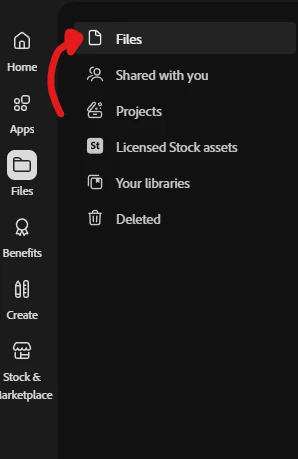
    @leo.r I figured it out! I had to move my file from ‘Projects’ into ‘Files’ and then I got the timeline button - was able to recover it to a few hours before the crash! Thanks for the help! 


    1 reply

    leo.r
    Community Expert
    Community Expert
    March 10, 2026

    Can you post a screenshot of the webpage where the Timeline icon is absent? Is your InDesign document saved as a ‘cloud document’ (.inddc)?

    eridona_5955
    Participant
    March 10, 2026

    Yes, it is a cloud document - screenshot attached.


    leo.r
    Community Expert
    Community Expert
    March 10, 2026

    Try to click the Files icon (which should show the list of files), click your document again. Will the Timeline icon appear after that?