
Bedazzled532
Inspiring
June 7, 2024
Answered

Reverse Numbers in Table of Contents (TOC) with images

  • June 7, 2024
  • 3 replies
  • 1114 views

Hi

I have a situation where a TOC is generated normally.

I want the number before the heading. After heading there is an anchor, which again will come in its new line.


I have attached a before and after. The grep which I am running is somehow removing the anchor mark. Interesting fact is that you can still view the anchor mark in story editor.


How can I achieve this? Number then the heading and then the anchor graphic. Before and after screenshot attached.

Thanks
This topic has been closed for replies.
Correct answer Barb Binder

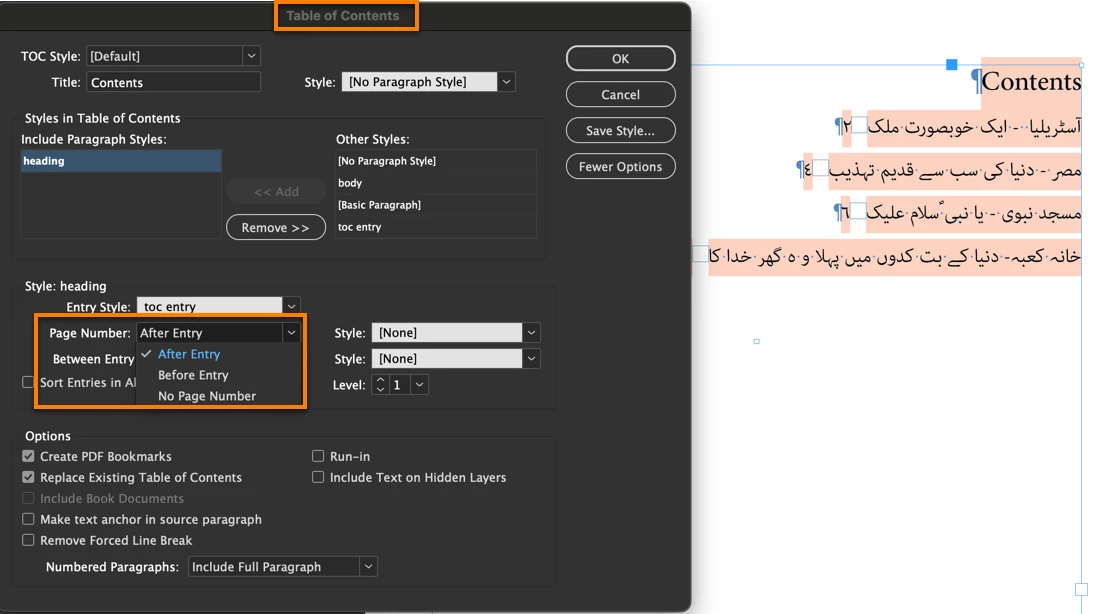
Yes I did that but there is no option to put the numbers before.

This is what Mike is referring to:


That's the easy part.


Then you need to move the anchor to the other side. I can use GREP to match the anchored object marker (~a) but when it moves, it's just the anchor. The graphic is missing, but as you said, the anchor is visible in Story Editor. Any ideas, @Mike Witherell?


~Barb

3 replies

Barb Binder
Community Expert
Barb BinderCommunity ExpertCorrect answer
Community Expert
June 7, 2024

Yes I did that but there is no option to put the numbers before.

This is what Mike is referring to:


That's the easy part.


Then you need to move the anchor to the other side. I can use GREP to match the anchored object marker (~a) but when it moves, it's just the anchor. The graphic is missing, but as you said, the anchor is visible in Story Editor. Any ideas, @Mike Witherell?


~Barb

~Barb at Rocky Mountain Training
Bedazzled532
Inspiring
June 7, 2024

@Barb Binder Thanks a lot. It was right under my nose and I could not find it. Thanks to @Mike Witherell also. I am sorry I couldnot find it. Now my work will be easy. Thanks to both of you.

Barb Binder
Community Expert
Community Expert
June 7, 2024

We are always happy to help., @Bedazzled532 .


~Barb 

~Barb at Rocky Mountain Training
Mike Witherell
Community Expert
Community Expert
June 7, 2024

Did you click on More Options to see all the features of the ToC Generator?

Mike Witherell
Bedazzled532
Inspiring
June 7, 2024

@Mike Witherell Yes I did that but there is no option to put the numbers before.

Bedazzled532
Inspiring
June 7, 2024

@Mike Witherell I am attaching the idml file, just in case.

Mike Witherell
Community Expert
Community Expert
June 7, 2024

Why not simply allow the ToC Generator to build this?

Mike Witherell
Bedazzled532
Inspiring
June 7, 2024

@Mike Witherell Unfortunately, I dont see any option to generate page numbers before the heading. Plz let me know if I am missing something.