
Participant
November 30, 2017
Answered

Revert Object to Master settings?

  • November 30, 2017
  • 1 reply
  • 4093 views

Hi all,

Below is my scenario and at the end is my question.

I have a new document. I create a master page with a text box. I create a page after that and then want manually edit the text box. I do so. Later, I want to revert the changes I made to that single text box to the original settings/content found in the master page. I do not want to reset the entire page via the master, just that one object (the text box).


Is there a way for me to revert singular objects to the master page settings without applying the entire master page? Alternatively, can I delete the object I'm working on in the page, go to the master page, and drag or apply a single master page object?


Thank you,
    This topic has been closed for replies.
    Correct answer hammer0909

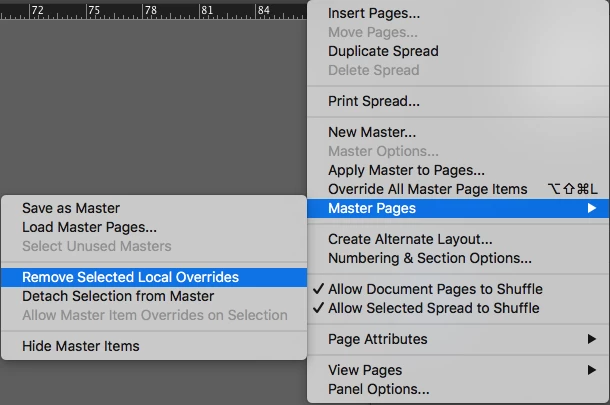
    You can absolutely do this by selecting the overridden text frame and then going to the Pages panel and clicking on the panel menu (little icon in the upper right corner), and choosing Master Pages > Remove Selected Local Overrides.

    1 reply

    hammer0909
    Community Expert
    hammer0909Community ExpertCorrect answer
    Community Expert
    November 30, 2017

    You can absolutely do this by selecting the overridden text frame and then going to the Pages panel and clicking on the panel menu (little icon in the upper right corner), and choosing Master Pages > Remove Selected Local Overrides.

    Participant
    November 30, 2017

    Perfect, thank you Chad. Now just have to look into making a hotkey for it.

    Best,

    Steve Werner
    Community Expert
    Community Expert
    November 30, 2017

    You can Cmd+Shift click an object on a page to override a single item on the Mac. That's Ctrl+Shift click the object on a Windows computer.