


m90583877
Known Participant
July 24, 2018
Answered

Right align text in an InDesign interactive form

  • July 24, 2018
  • 1 reply
  • 5271 views

Hi everyone,

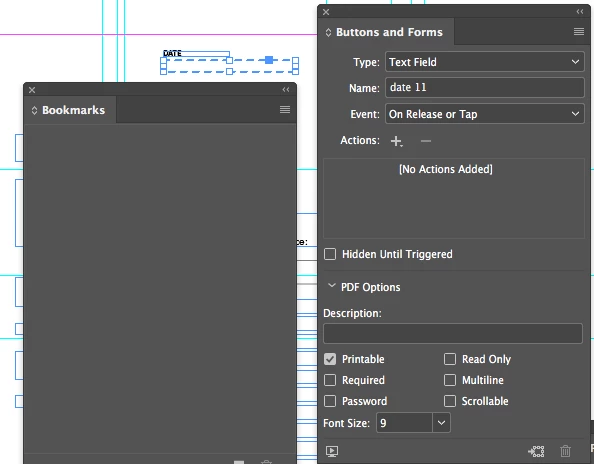
is it possible to right align the text in an Indesign interactive form? I only see options for the font size, not even font family, are there more settings to it, most importantly alignment?

Thank you!

This topic has been closed for replies.
Correct answer BobLevine

https://www.id-extras.com/products/formmagic

1 reply

vladan saveljic
Inspiring
July 24, 2018

You could set align right to your text box in indesign

or

you could do it in acrobat pro

field properties > alignment

BobLevine
Community Expert
BobLevineCommunity ExpertCorrect answer
Community Expert
July 24, 2018

https://www.id-extras.com/products/formmagic

TᴀW
Legend
July 24, 2018

Thanks Bob for the mention.

Yes, FormMagic gives you all the missing controls for interactive PDFs right inside InDesign: Alignment, font, color, rich text (italics, bold, etc.), even c|o|m|b| |f|i|e|l|d|s. (And FormMaker, its big brother, adds the form validation/calculation/javscript formatting options as well.)

The free edition gives you a 1-page, 10-field form with all the options, for free...

Ariel

Visit www.id-extras.com for powerful InDesign scripts that save hours of work — automation, batch tools, and workflow boosters for serious designers.