Participant
Dec 7, 2016 8:17 PM UTC
Answered

Right Aligned Numbers in Table of Contents

Is there any way to create right aligned numbers in a Table of Contents without having to manually insert a tab before each line?

You can create the headings easy enough with right aliened numbers.

    MigintoshCorrect answer
    Legend
    May 31, 2017 4:24 AM UTC

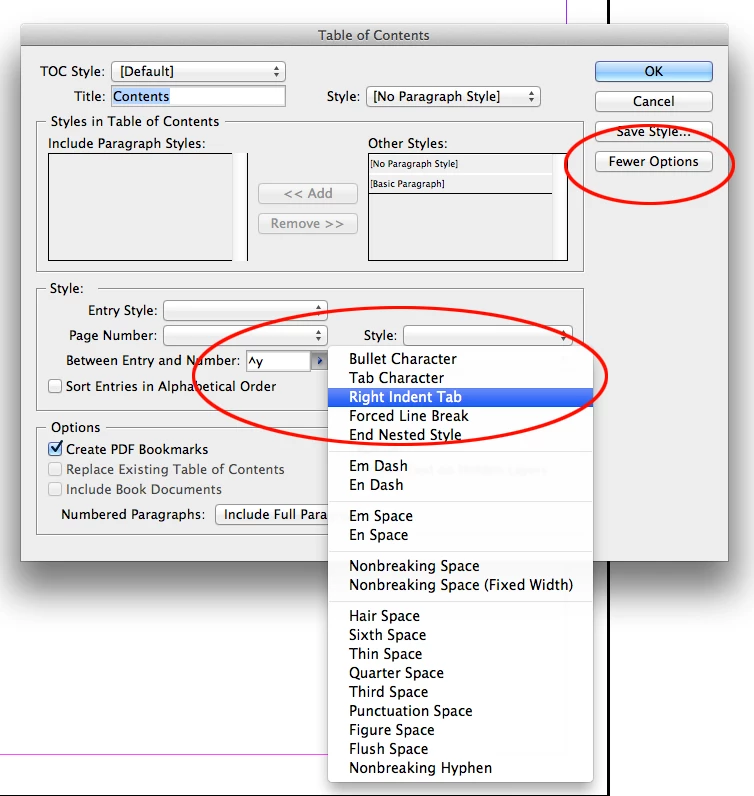
    Click the More Options box, and in the Between Entry and Number field, either type ^y or click the arrow to the right of the field and choose the option from the pull-down menu.

    14 replies

    Participant
    Mar 28, 2024 4:14 PM UTC

    I did this and it moved my numbers to the next line on the left?

    Translate
    Deadly Fredly
    Participating Frequently
    Mar 28, 2024 4:22 PM UTC
    Sounds like your TOC text style's tab stop isn't in the correct position or
    isn't the correct tab stop alignment type.
    Translate
    Participant
    Sep 16, 2025 3:39 PM UTC

    Can you tell me how to fix this?


    Translate
    Participant
    Nov 24, 2022 2:47 AM UTC

    Thank you so much everything for you

    Thank you so much everything for you

    Translate
    Peter Kahrel
    Community Expert
    Community Expert
    Dec 7, 2016 9:01 PM UTC

    In the Table of Contents window, select right-align tab in the 'Between entry and Number' dropdown.

    Translate
    BlindyDesign
    Participant
    May 31, 2017 1:06 AM UTC

    There is no right - align tab option in Between entry and number. 

    Translate
    MigintoshCorrect answer
    Legend
    May 31, 2017 4:24 AM UTC

    Click the More Options box, and in the Between Entry and Number field, either type ^y or click the arrow to the right of the field and choose the option from the pull-down menu.

    Translate