Mark.y.Mark
Known Participant
November 4, 2024
Answered

Right Edge of Table Cell Not Displaying in InDesign

  • November 4, 2024
  • 2 replies
  • 512 views

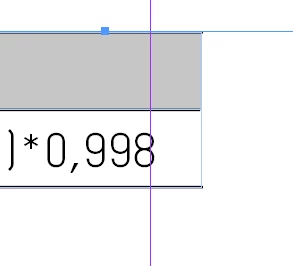
Hello all, see above image. I've made a view tables with one table style. They all come out perfect except for this one. The line on the right side is not showing. You can see by the middle line (which is slightly shorter) that the program knows there should be something. I've tried everything but cannot fix it? What am I missing?


Kind regards


<Title renamed by MOD>

This topic has been closed for replies.
Correct answer Anshul_Saini

Hello @Mark.y.Mark,


Thanks for reaching out. It looks like the right edge of the table cell isn’t displaying as expected. Here are a few troubleshooting steps you can try in InDesign to fix this:


1. Select the table and go to Table > Cell Options > Strokes and Fills. Make sure the right edge has a stroke applied.

2. Occasionally, cells can merge unintentionally or overlap slightly. Verify that no cells are merged in a way that would hide the border. If this is a possibility, go to Table > Unmerge Cells.

3. Ensure that the Cell Insets (found in Table > Cell Options > Text) do not affect the cell’s border display, especially on the right side. Reduce any insets that are set too large.

4. If the table is part of a larger frame or container, check that the frame isn’t cropping the edge of the table. Try resizing the frame slightly to see if this brings the line back.

5. If none of the above works, try copying the content, deleting the problematic cell or row, and then re-adding it. Paste the content back in to see if the issue is resolved.

6. Ensure there are no other objects or layers that might be covering the right edge. Sometimes, even a thin line can obscure parts of a table cell border.


Give these steps a try, and let me know if the issue persists!

Best,

Anshul Saini

2 replies

Robert at ID-Tasker
Legend
November 5, 2024

@Mark.y.Mark


Select whole table, then clear Cell and Table Style  overrides.


Anshul_Saini
Community Manager
Anshul_SainiCommunity ManagerCorrect answer
Community Manager
November 4, 2024

Hello @Mark.y.Mark,


Thanks for reaching out. It looks like the right edge of the table cell isn’t displaying as expected. Here are a few troubleshooting steps you can try in InDesign to fix this:


1. Select the table and go to Table > Cell Options > Strokes and Fills. Make sure the right edge has a stroke applied.

2. Occasionally, cells can merge unintentionally or overlap slightly. Verify that no cells are merged in a way that would hide the border. If this is a possibility, go to Table > Unmerge Cells.

3. Ensure that the Cell Insets (found in Table > Cell Options > Text) do not affect the cell’s border display, especially on the right side. Reduce any insets that are set too large.

4. If the table is part of a larger frame or container, check that the frame isn’t cropping the edge of the table. Try resizing the frame slightly to see if this brings the line back.

5. If none of the above works, try copying the content, deleting the problematic cell or row, and then re-adding it. Paste the content back in to see if the issue is resolved.

6. Ensure there are no other objects or layers that might be covering the right edge. Sometimes, even a thin line can obscure parts of a table cell border.


Give these steps a try, and let me know if the issue persists!

Best,

Anshul Saini

Mark.y.Mark
Known Participant
November 5, 2024

Hello Anshul, 


Thank you for your response. Trying all the 6 steps and only the 5th step worked but when copying the data to a whole new table. This is not the only solution I hope?


I've also tried @Robert at ID-Tasker 's solution and this worked. Apperantly the line not showing was in my cell-style for the table header. After re-applying that style to the table header row the line is showing as it should be. Can you tell me what could have caused this? I'm just trying to understand what happened.


Thanks in advance!

Robert at ID-Tasker
Legend
November 5, 2024

@Mark.y.Mark


At some point you must've done so called "local override" - removed either thickness of the stroke or color.