remadepreacher
Inspiring
June 25, 2018
Answered

Right Indent trouble in ToC

  • June 25, 2018
  • 1 reply
  • 1137 views

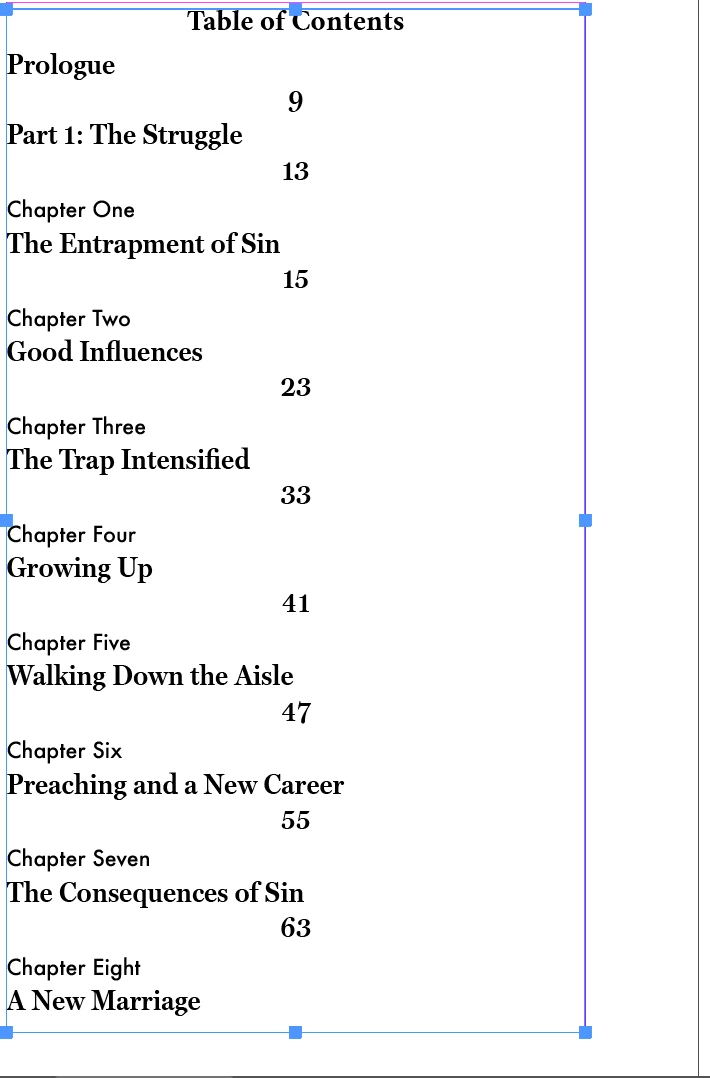
I'm using Indesign CC 2018 on a MacBook with High Sierra. I'm trying to set up the ToC. When I click right indent for the page #, it puts it on the next line in the center. The added lines keeps the ToC from fitting in two pages.

    This topic has been closed for replies.
    Correct answer remadepreacher

    Hi remadepreacher:

    Most importantly, I'm glad this is working for you, but I'm not sure what you mean by "deleting the default tab signature"?

    I tried your suggestion and it lost the extra line but the table is back to having the page numbers in a raged line.

    For others reading this thread in the future looking for a solution in the same situation, this is a two-step process.

    1. first add the tab character (the ^t in the TOC dialog box, >> on the page), then
    2. set a right-aligned tab stop to position the numbers. (The number position will be ragged until you set the tab stop.)

    ~Barb


    Barb, thanks for the reminder to explain more fully. When I first attempted to add a right indent tab, ^t (tab) was already in the box for between Entry and Number. This seems to be the default. So when I clicked right ident tab in the box's options, ^y was added (^y^t). This caused the right indent to fail.  What I discovered is, I needed to erase the default ^t, then click the box's  arrow and chose Right indent tab. This then put the right indent (^y) in and it functioned flawlessly.

    1 reply

    Barb Binder
    Community Expert
    Community Expert
    June 25, 2018

    Hi remadepreacher:

    What have you defined Between Entry and Number in the TOC dialog box? You will want a tab, as shown below.

    Once you have a tab, you want to add a right tab stop (not a right indent) to the paragraph style. (And perhaps define a leader while you are at it.)

    ~Barb

    ~Barb at Rocky Mountain Training
    remadepreacher
    Inspiring
    June 25, 2018

    I tried your suggestion and it lost the extra line but the table is back to having the page numbers in a raged line.

    Adding a leader makes no difference. I still don't understand why a right indent tab selected between entry and number is not on the right and in the same line.

    remadepreacher
    Inspiring
    June 25, 2018

    Ok, I tried deleting the default tab signature and then selecting the right indent tab and it works.