
taritta
Participant
July 8, 2020
Answered

Right to left text doesn't work.

  • July 8, 2020
  • 3 replies
  • 2010 views

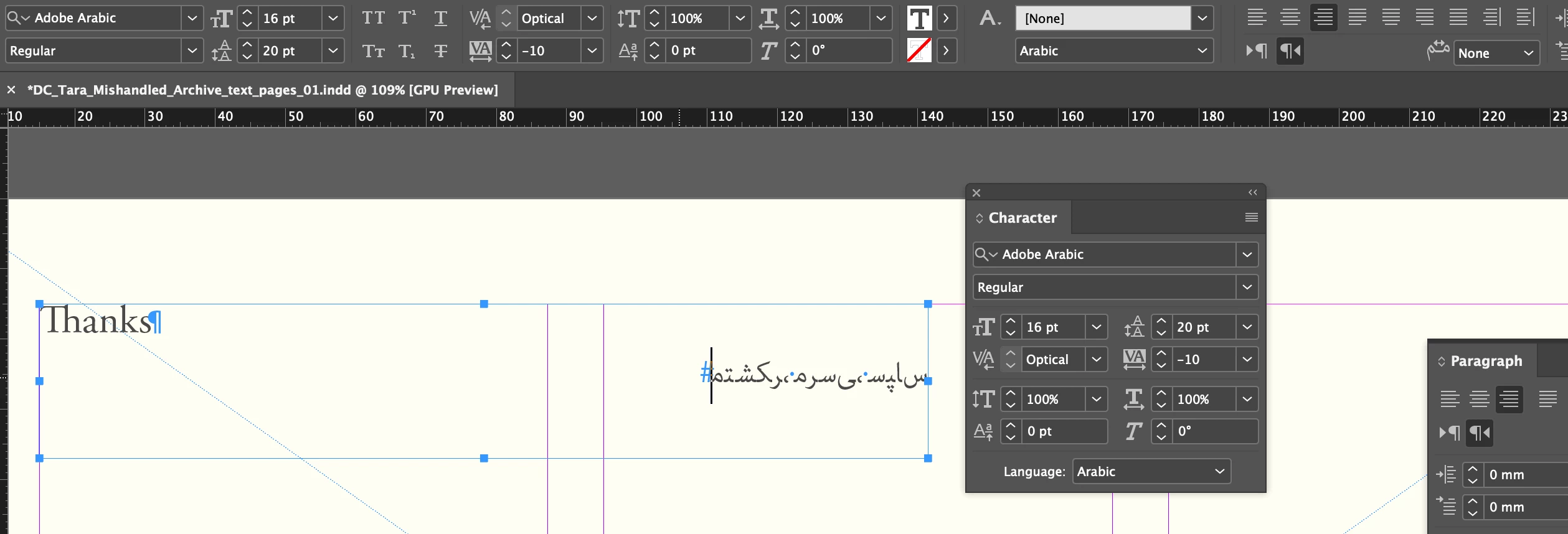
I have a mainly English text that has a few words in Farsi. Whatever I do, the Farsi letters are not arranged from right to left and don't connect with each other. I uninstalled my 15.1.1 English (international) indesign, changed language settings to Arabic and installed the latest MENA version to fix this (although I've previously worked on English indesign and this was not an issue). I still have the same problem on the Arabic edition. I've tried world ready single line and paragraph composer, changing paragraph direction – none work. See screenshot for settings.
This topic has been closed for replies.
Correct answer taritta

Setting character direction to right-to-left solved this (Thanks Mike). In the English version my Farsi fonts were all automatically set to right-to-left (because there's no other option), this changed when I changed to the Arabic version so I had to set it manually (character panel > reveal more options > character direction). 

3 replies

taritta
tarittaAuthorCorrect answer
Participant
August 8, 2020

Setting character direction to right-to-left solved this (Thanks Mike). In the English version my Farsi fonts were all automatically set to right-to-left (because there's no other option), this changed when I changed to the Arabic version so I had to set it manually (character panel > reveal more options > character direction). 

Zaid Al Hilali
Community Expert
Community Expert
July 9, 2020

From the screenshot you provided, you have the right Middle Eastern version. I'm eliminating the "Adobe World Ready" and "Paragraph Alignment" factors because you mentioned that you've made sure they were properly set and I can relate to this because if any of the above were not properly set, you will see your Arabic/Farsi text this way…


I feel there is something with the font although you're using Adobe Arabic, it could be corrupted. Can you try with other Arabic fonts to see if things will improve?

Mike Witherell
Community Expert
Community Expert
July 8, 2020

Preferences > Advanced Type > Input Method Options > Use Inline Input for Non-Latin Text

Mike Witherell
taritta
tarittaAuthor
Participant
July 8, 2020

Thanks Mike. I can see that Use Inline Input for Non-Latin Text was already ticked.

Mike Witherell
Community Expert
Community Expert
July 8, 2020

According to very old notes of my own making, you turn that feature ... OFF? I cannot find it in the Adobe help files anymore, and I have never actually done it, so sorry if that is an incomplete thought...

Mike Witherell