

RTL parts (Hebrew) not working in LTR document
InDesign 17.4 (MENA edition)
I have received a file (= file 1) with fully formatted character and paragraph styles. Since the text I’m working with includes parts in Hebrew, I have added a “Hebrew” character style with Middle East Character Formats > Character Direction: Right-to-Left turned on. Unexpectedly, however, the Hebrew parts do not run from right to left – the letters are arranged in left-to-right order:

The result is the same whether the Character Direction in the according body paragraph style setting with the same name as above (Middle East Character Formats) is set to RTL or LTR. There are no overrides in the file.
Now here is the truly mysterious thing: if I load the body paragraph style from another file (= file 2) I am currently working on – one that I created myself – and copy and paste the text from file 1 to this one, the Hebrew is displayed correctly:
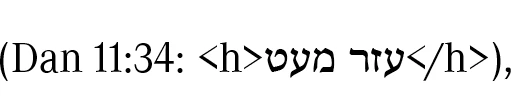
In other words, in file 1 the text is entered correctly, and both the character style and the paragraph style have the correct MENA settings. But why is the Hebrew displayed incorrectly?


 AdChoices