


HugoTW
Participating Frequently
September 10, 2018
Answered

Run script from command line

  • September 10, 2018
  • 3 replies
  • 8745 views

Greeting all,

What I am trying to do is to force InDesign to open a jsx file directly. It seems not working either using command line tool or opening jsx file directly. The error message is captured as below image.
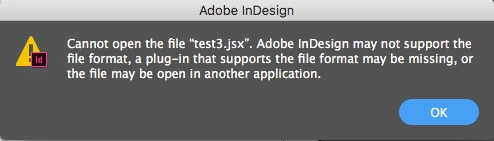
Can anyone please advise the best way to trigger a script file from command line? The reason to do so is that the jsx file is generated dynamically by hardware.

Thanks in advance!

Best,

Hugo 

This topic has been closed for replies.
Correct answer Sunil Yadav

Try this,

This is command line argument,

wscript.exe D:\SunilY\Test\vbScript.vbs

This is my vbScript.vbs

Set myInDesign = CreateObject("InDesign.Application.CC.2017")

dim myArray, myString

myTestJavaScript = "D:\SunilY\Test\test.jsx"

myInDesign.DoScript myJavaScript, 1246973031

3 replies

Sunil Yadav
Sunil YadavCorrect answer
Legend
September 10, 2018

Try this,

This is command line argument,

wscript.exe D:\SunilY\Test\vbScript.vbs

This is my vbScript.vbs

Set myInDesign = CreateObject("InDesign.Application.CC.2017")

dim myArray, myString

myTestJavaScript = "D:\SunilY\Test\test.jsx"

myInDesign.DoScript myJavaScript, 1246973031

HugoTW
HugoTWAuthor
Participating Frequently
September 12, 2018

yadavs92328

Thanks! It works like a charm!

Sunil Yadav
Legend
September 10, 2018

You can't just open .jsx file into indesign application. If you want to execute jsx, you can call jsx from vb script, and call that vbscript from command line.

Steve Werner
Community Expert
Community Expert
September 10, 2018

Ask in the InDesign Scripting forum. I'll move your messge there now.