
setho77557739
Inspiring
February 1, 2023
Answered

Running Header

  • February 1, 2023
  • 1 reply
  • 1787 views

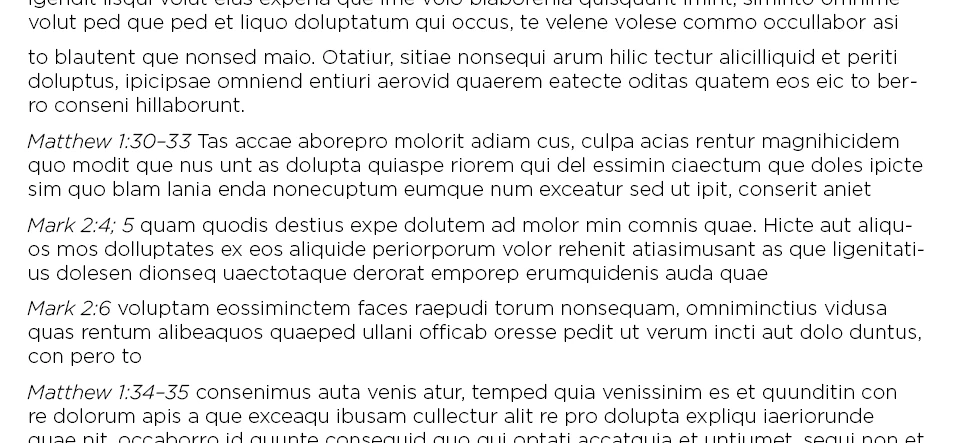
I need to create running headers from the first instances of Bible reference on each page of a book I'm working on. The trick is that I don't want to include any dashes or semicolons or anything after them in my running header. In the case of the screenshot example, I would want my running head to just read "Matthew 1:30". I'm assuming this is going to take a grep style, but admittedly my grep coding skills aren't very good. If someone could point me to the solution it would be much appreciated! After solving this, I will need to do the same with the last reference on right-hand pages.


This topic has been closed for replies.
Correct answer Peter Spier

OK, this is REALLY wierd.

I did some more testing in both CS6 and in CC 2021 which both happen to be open at the moment on my machine. In both cases the GREP works if there is a single paragraph in the story using Find/Change, but not if there are multiple paragraphs, and as a GREP style it works for the first three of 4 in CS6, but only the first two in CC 2021.


I'd like to hear from some of the GREP experts...


And some more testing...

Part of the problem seems to be the .+, so I've changed that to \w+ and the \s seems to be the other problem, so I've changed that to a typed space, so the new expression, whch seems to work now, is ^(\w+? )+\d+:\d+

1 reply

Peter Spier
Community Expert
Community Expert
February 1, 2023

Try using this expresion to assign a GREP style:

^(.+?\s)+\d+:\d+

It should find any one or more words at the start of a paragraph followed by a space and then any number of digits a colon and more digits.

setho77557739
Inspiring
February 1, 2023

Thanks for your help. I don't know why that's not working for me.

Peter Spier
Community Expert
Community Expert
February 1, 2023

What happens when you try it?