

Sample buttons, forms panel appears/opens on app launch
The Sample buttons and forms panel, along with a few other panels (all grouped but hanging), started appearing when I launched the InDesign app (12.0.0.81). It disappears when I open some of my latest documents which are using a custom workspace, even though I never modified the 'Start' workspace. I found a solution by toggling the following checkbox options in Preferences… > General > General (see screen capture below), through which any option(s) selected/deselected seems to now prevent said grouped panel from appearing/opening upon launch.
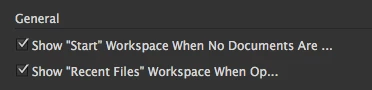
A couple of more quirks: 1. The first Workspace toggle option seems to also control the following toggle option of displaying 'Recent Files'… instead of just the workspace; 2. The shortened descriptions of those toggle/checkbox options don't provide a pop-up that expands their context completely and they're also cut to a point that's 2/3 of the width of the Preferences panel window—strange, really.
 AdChoices