Save sequential PDFs with Excel data
(sorry for my english)
I am a teacher and i've been struggling with creating my students tests.
Suppose i have a indd file with a simple kinematics question like this one:
"The car drove 100 kilometers in 2 hours"
I want to create a indd file with something like this:
"The car drove A kilometers in B hours"
where A and B comes from an Excel spreadsheet like this one:
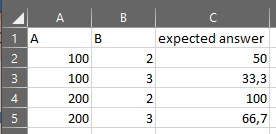
Then i want to save sequential PDFs by just changing the row of data on excel so i can have multiple tests each with an unique answer and i can easily check the correct answer on each one.
I tried to use LaTeX but im not progressing as well as i would want and since im already a indesign user it would be great to stay with adoe on this one
It it possible to accomplish such task on indesign? maybe with scripts?
 AdChoices