I've searched for this answer but it still eludes me. How can I add InDesign page templates (size, bleed, margins, column, slug) to CC libraries so that I can then share them with other InDD users?
It is not possible to add these to the CC Library panel at this time.
While it is not quite what you are asking, you could still create a preset and share this with the other users, which would cover some of your use cases:
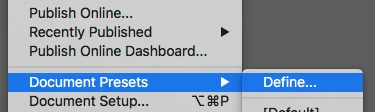
- Got to File > Document Presets > Define
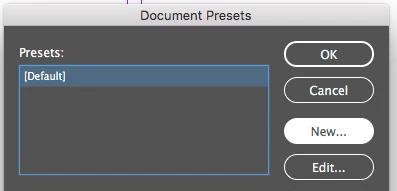
- Click on 'New':
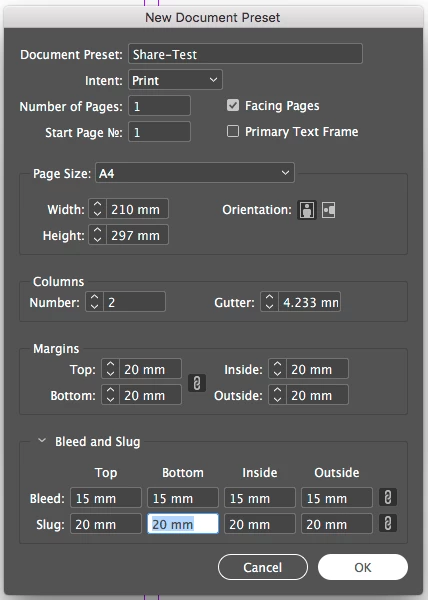
- Define your presets and click on 'OK':
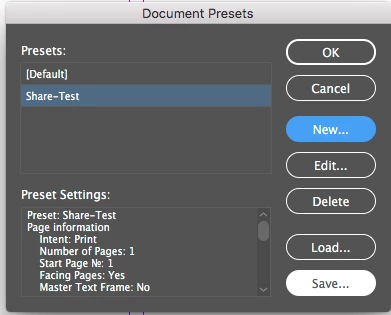
- In the 'Document Presets' window, highlight your new preset, and click on 'Save':
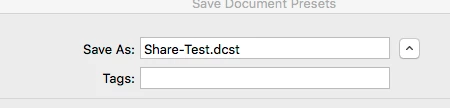
- Enter the name of the file you wish to save, and save it in your desired location:
The other users can then go to File> Document Presets > Define, and click on 'Load', then navigate to the file you created and load your preset in their app, and use it to create new documents.
It is not possible to add these to the CC Library panel at this time.
While it is not quite what you are asking, you could still create a preset and share this with the other users, which would cover some of your use cases:
- Got to File > Document Presets > Define
- Click on 'New':
- Define your presets and click on 'OK':
- In the 'Document Presets' window, highlight your new preset, and click on 'Save':
- Enter the name of the file you wish to save, and save it in your desired location:
The other users can then go to File> Document Presets > Define, and click on 'Load', then navigate to the file you created and load your preset in their app, and use it to create new documents.
You can store InDesign templates in your Creative Cloud files storage but not in CC Libraries. Give the CC files a try. You can still share them with other users, just not in a panel within an application. Go to creative.adobe.com and click on Creative Cloud files. Or you can just drop them into your Creative Cloud Files folder on your computer.
Unless I am wrong, you won't be able to store "pages" into CC libraries. However you can totally store page contents by drag-n-dropping the items onto the library.
If you really need more, you could save one page documents as templates onto a shared folder or use some DAM.
 AdChoices